1. Introduction
1.1. Overview
This document describes how the “EC-Engineer SDK EniEngine Layer 5” can be integrated into an already existing software environment by using the “ENI Builder” sample code (for C# or C++).
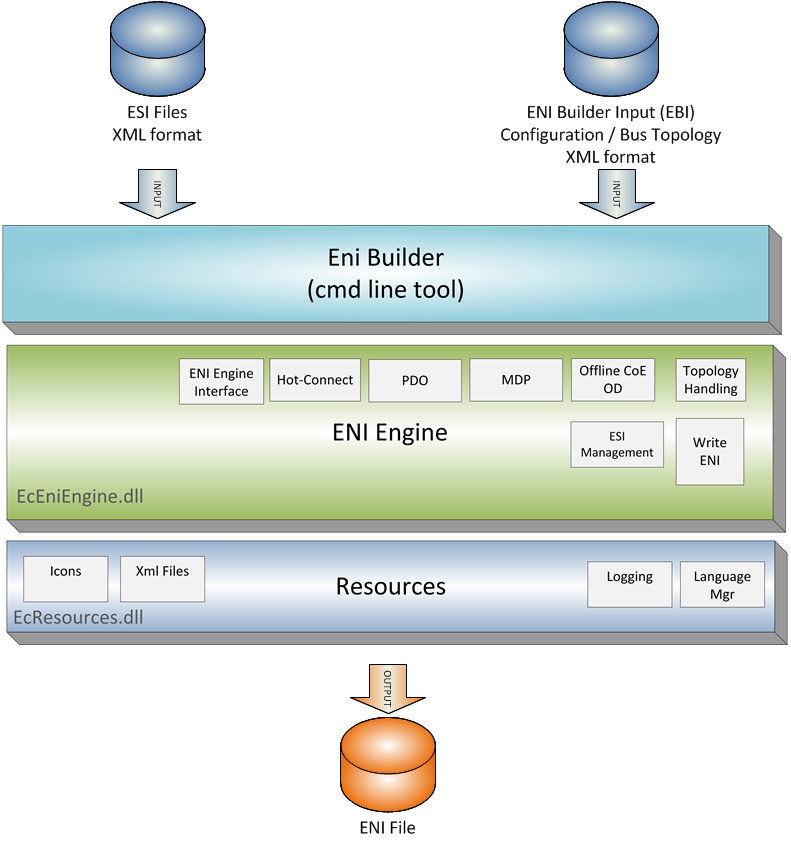
This document describes the usage of the “ENI Builder”. It is a command line utility which is controlled by a XML based ENI Builder Input (EBI) file (config.xml) and generates the EtherCAT bus description file (EtherCAT Network Information, ENI) according to ETG.2100 (v1.0.0).
The EBI file describes the EtherCAT bus topology (identity of EtherCAT slave devices and how they are connected to each other) and additional settings of each slave. Further HotConnect / HotPlug feature is supported.
In order to generate the ENI, the EtherCAT Slave Information (ESI) according to ETG.2000 (v.1.0.1) is required for each slave.
1.2. Requirements
1.2.1. For Developers
Microsoft Windows 7 and above
- Microsoft .NET Framework
Visual Studio 2019
- Microsoft .NET Core
Visual Studio 2022
1.2.2. For Deployment
- Microsoft .NET Framework
- Windows (x86/x64)
Microsoft Windows 10 and above
Microsoft .NET Framework 4.6.2
Microsoft Visual C++ 2010 Runtime
- Linux (x86/x64)
Mono 3.2 and above (install mono-cmplete)
- Microsoft .NET Core
- Windows (x86/x64)
Microsoft Windows 10 and above
Microsoft Visual C++ 2010 Runtime
- Linux (x64/ARM)
Ubuntu 16.04 x64 and above
- .NET 8 Runtime
Memory as recommended for operating system
Disk space approximately 80 MB (depend on number of ESI files)
1.3. EtherCAT Slave descriptions (ESI files)
The ESI files of the connected slaves must be located in the “EtherCAT” subdirectory.
Upon first program start, the tool will scan this directory for ESI files and writes out a cache file (ESICache.xml). This file is read in on subsequent program starts in order to shorten the start time.
ESICache.xml must be deleted by the user if new ESI files are copied to the ESI directory in order to recreate the ESI cache on the next program start.