6. Sample Code for C++
6.1. Getting Started
Open the Visual Studio 2019 Solution (”SrcCppEniBuilderForCpp.sln”) and do the following things:
Remove unavailable projects (EcResources, EcEniEngine, …)
Compile the solution (Output folder of the “Debug” configuration is the root folder, where all the binaries are located)
Run “EniBuilderForCpp.exe” with parameter “
C:myEniBuilderDirconfig_simple.xml”, which will generate anENIfile based on theEBIfile settings
6.2. Architecture
EniBuilderForCpp contains the following components:
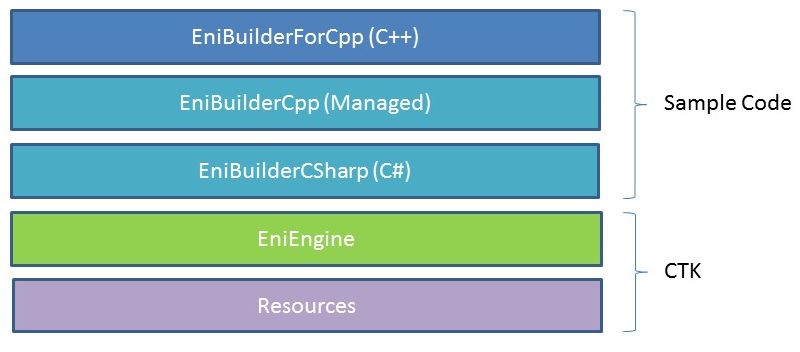
- Sample Code
EniBuilderForCpp.exeWin32 Console Application, which parses the command line parameters and loads the
EniBuilderCpp.dll
EniBuilderCpp.dllWin32 Managed Code Library, which exports a wrapper class named “
CEniBuilderCpp”. This class converts the data from C++ to C# and back
EniBuilderCSharp.dllC# Class Libaray, which loads the “EniEngine” for generating the
ENIfile
- CTK
- EniEngine (
EcEniEngine.dll) EthterCAT Slave Information File (
ESI)EtherCAT Network Information File (
ENI)ENI Generation (PDO, MDP, CoE, DC, Hot Connect, …)
EniBuilder Input File Format (
.ebi)
- Resources (
EcResources.dll) Language Manager
Logger
- EniEngine (
6.3. Command line interface
The command line interface supports the following commands:
- Name of the
EBIfile Specify the path to the
EBIfile which contains all information for generating theENIfile./APPDATA=”Path to AppData directory” (optional)Specify the path to the AppData directory. It contains a subfolder “EtherCAT” with all
ESIfiles and it is also the path for the logfile./INDENTXMLFILES(optional)Activates indenting of
XMLfiles (makes exportedXMLfiles readable, but increases size)./IGNOREREVISION(optional)Deactivates the revision check, if slave was not found and tries to find a compatible slave.