

3.3. Accessing process data in the application
The process data, exchanged between the EC-Simulator stack and the SubDevices in every cycle, are stored in the process data image. There are two separate memory areas, one for the input data and another one for the output data.
The base addresses of these areas are provided by calling the functions esGetProcessImageInputPtr() and esGetProcessImageOutputPtr().
The size of the process data image is defined in the ENI file under “EtherCATConfig/Config/ProcessImage/Inputs/ByteSize” and “EtherCATConfig/Config/ProcessImage/Outputs/ByteSize” and is returned by esIoCtl - EC_IOCTL_GET_PDMEMORYSIZE and esRegisterClient() at EC_T_REGISTERRESULTS::dwPDOutSize and EC_T_REGISTERRESULTS::dwPDInSize.
See also
3.3.1. Process Data Access Functions selection
Process data variables that are packed as an array of bits are bit aligned and not byte aligned in the process data.
See also
EC_COPYBITS for how to copy data areas with bit offsets that are not byte aligned.
Getting and setting bits that are bit aligned and not byte aligned should be done using EC_SETBITS and EC_GETBITS. Complete EC_T_BYTE, EC_T_WORD, EC_T_DWORD, EC_T_QWORD can be accessed more efficiently using the appropriate macros according to the following table.
Note that these functions do not initiate any transfer on wire. Typically process data is transferred as little endian on wire and therefore must be swapped on big endian systems like PPC to be correctly interpreted, see hints in table below.
Variable type (Bit size) |
Macro |
Hint |
|---|---|---|
EC_T_BYTE (8) |
N/A |
Bytes are byte-aligned and can be directly addressed at pbyBuffer[ BitOffset/8] |
EC_T_WORD (16) |
EC_SET_FRM_WORD, EC_GET_FRM_WORD |
Contains swap for big endian systems |
EC_T_DWORD (32) |
EC_SET_FRM_DWORD, EC_GET_FRM_DWORD |
Contains swap for big endian systems |
EC_T_QWORD (64) |
EC_SET_FRM_QWORD, EC_GET_FRM_QWORD |
Contains swap for big endian systems |
Bit(1) |
EC_SETBITS / EC_GETBITS |
3.3.2. Process variables’ offset and size
The following screenshot shows variables’ offset and size within the Process Data Image:
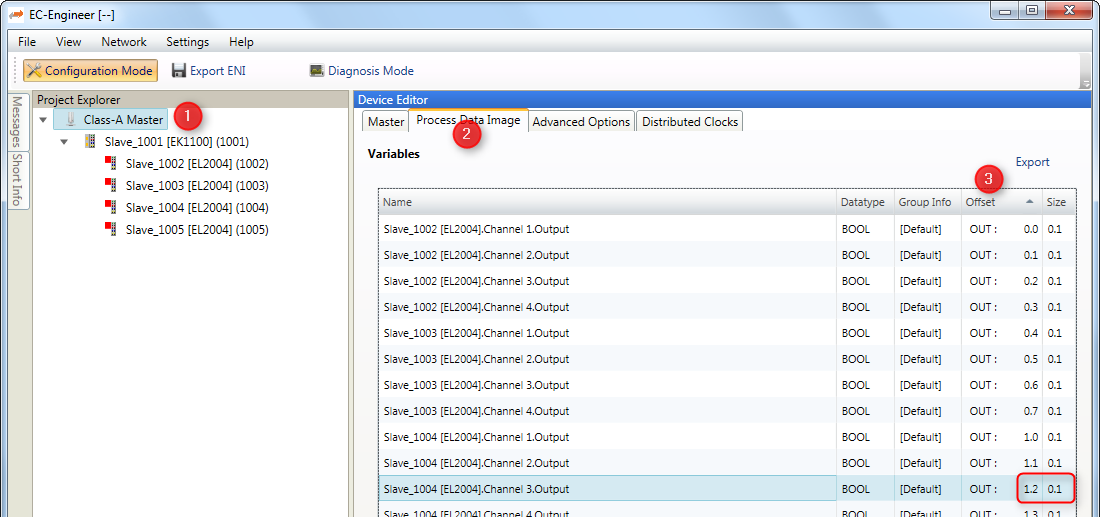
Accessing the process data of a specific SubDevice always works by adding an offset to the base address.
There are different ways possible to get this offset. All offsets are given as bit offsets! The offset values will not change until a new configuration is provided (s.a. esConfigureNetwork()), therefore it is sufficient to load them once right after esConfigureNetwork(), it is not needed every cycle.
3.3.2.1. Manually hard coded offsets (compiled in application)
The offset value is figured out from the EtherCAT® configuration tool. It’s not recommended to use fixed values because the offsets change when adding/removing SubDevices to/from the configuration.
As listed in the screenshot above “SubDevice_1004 [EL2004].Channel 3.Output” in the example is at offset 1.2 with size 0.1. The numbering is Byte.Bit so the offset in the example is Byte 1, Bit 2 means bit offset 8*1+2 = 10 and size is 0*8+1 = 1.
Sample code:
EC_T_BYTE byNewValue = 0x01;

/* get variable from process data */

EC_GETBITS(esGetProcessImageOutputPtr(dwSimulatorInstanceId), &byNewValue, 10 /* offset in bits */, 1 /* size in bits */);
3.3.2.2. Generated PD Layout (compiled in application)
The EC-Engineer can export the process variables to a PD Layout File (C-Header) using the menu item “Network > Export Process Variables” as shown in the following screenshots:
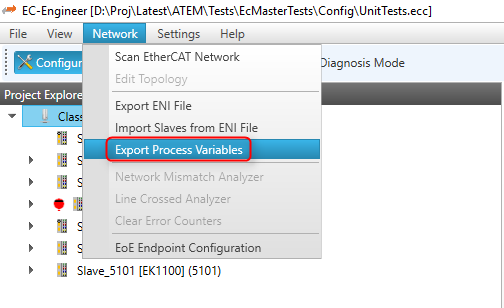
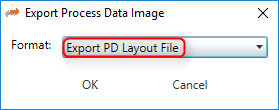
This will generate a header file containing the SubDevice’s variables like this:
    [...]
#include EC_PACKED_INCLUDESTART(1)
#define PDLAYOUT_OUT_OFFSET_SLAVE_2002 22
typedef struct _T_PDLAYOUT_OUT_SLAVE_2002
{
    EC_T_SWORD  swChannel_1_Output; // Slave_2002 [EL4132].Channel 1.Output ...
    EC_T_SWORD  swChannel_2_Output; // Slave_2002 [EL4132].Channel 2.Output ...
} EC_PACKED(1) T_PDLAYOUT_OUT_SLAVE_2002;
#include EC_PACKED_INCLUDESTOP
Example for changing values in e.g. myAppWorkPd:
EC_T_WORD wVal = EC_GET_FRM_WORD(&((T_PDLAYOUT_OUT_SLAVE_2002*)(pbyPDOut +
PDLAYOUT_OUT_OFFSET_SLAVE_2002))->swChannel_1_Output);
3.3.2.3. SubDevice / variable offset from configuration
3.3.2.3.1. esGetCfgSlaveInfo
Figure out the SubDevice offsets dynamically by calling the function esGetCfgSlaveInfo():
The offsets are stored in EC_T_CFG_SLAVE_INFO::dwPdOffsIn and EC_T_CFG_SLAVE_INFO::dwPdOffsOut.
E.g. setting “SubDevice_1004 [EL2004].Channel 3.Output” according to the screenshot above is like:
EC_T_BYTE byNewValue = 0x01;

EC_T_CFG_SLAVE_INFO SlaveInfo;
dwRes = esGetCfgSlaveInfo(dwSimulatorInstanceId, EC_TRUE, 1004, &SlaveInfo);

/* get variable from process data */
EC_GETBITS(esGetProcessImageOutputPtr(dwSimulatorInstanceId), &byNewValue, SlaveInfo.dwPdOffsOut + 2 /* variable relative offset in bits within SubDevice sync unit */, 1 /* variable size in bits */);
3.3.2.3.2. esFindInpVarByName
Figure out the variable offset by calling the function esFindInpVarByName() or esFindOutpVarByName():
The offset is stored in EC_T_PROCESS_VAR_INFO::nBitOffs. Each input or output has a unique variable name. All variable names are stored in the ENI file under “EtherCATConfig/Config/ProcessImage/Inputs/Variable”.
E.g. setting “SubDevice_1004 [EL2004].Channel 3.Output” according to the screenshot above is like:
EC_T_BYTE byNewValue = 0x01;

EC_T_PROCESS_VAR_INFO VarInfo;
dwRes = esFindOutpVarByName(dwSimulatorInstanceId, "SubDevice_1004 [EL2004].Channel 3.Output", &VarInfo)

/* get variable from process data */
EC_GETBITS(esGetProcessImageOutputPtr(dwSimulatorInstanceId), &byNewValue, VarInfo.nBitOffs /* variable absolute offset in bits within Process Data Image */, VarInfo.nBitSize /* size in bits */);