1. Introduction
1.1. Overview
EC-Engineer is a configuration and diagnosis tool for EtherCAT networks that are controlled by the EC-Master.
- The following screenshot shows the EC-Engineer in configuration mode:
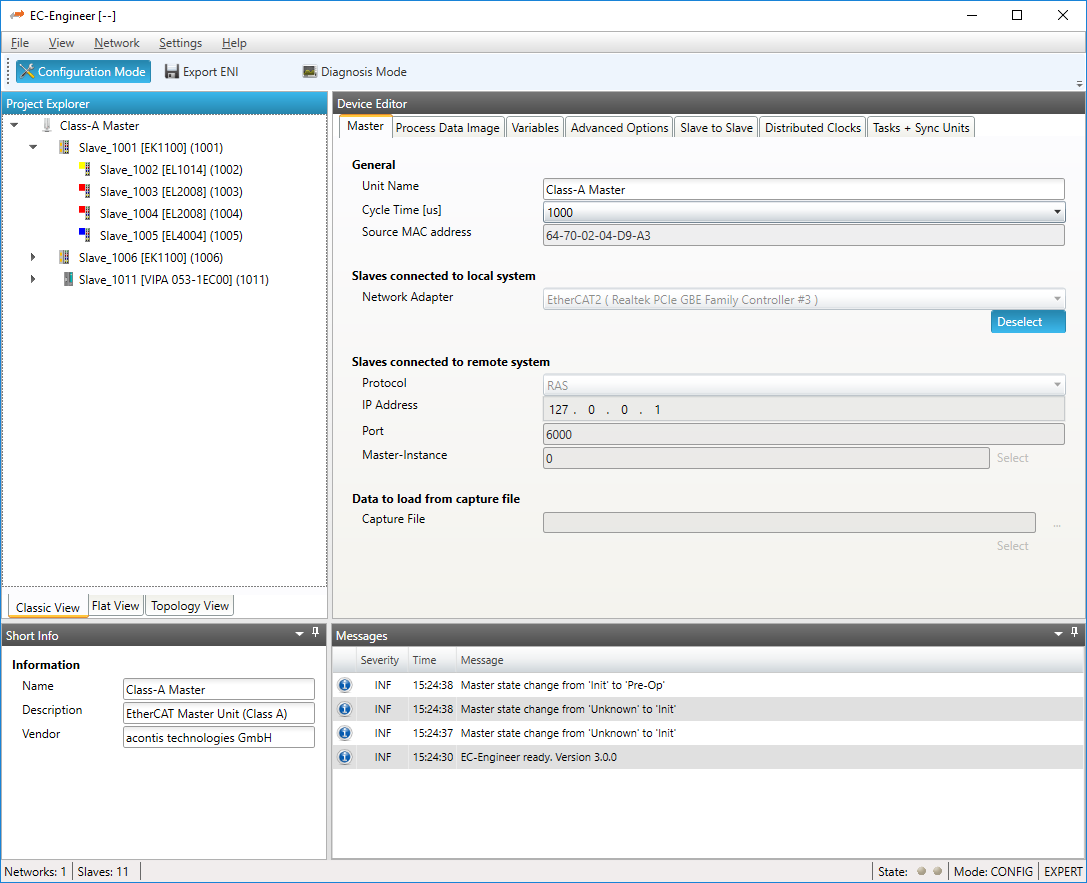
It runs on the Engineering System where the engineer can configure the EtherCAT network. All slaves default to settings that match the Slave’s typical use case. Complex networks or installations with special requirements need adjustments to the default settings. Using the Configuration Mode, the user can configure his EtherCAT network according to the project’s needs.
- As the result of his work the user can export the EtherCAT Network Information (
ENI) file, which is necessary to run the EC-Master on the Control System: 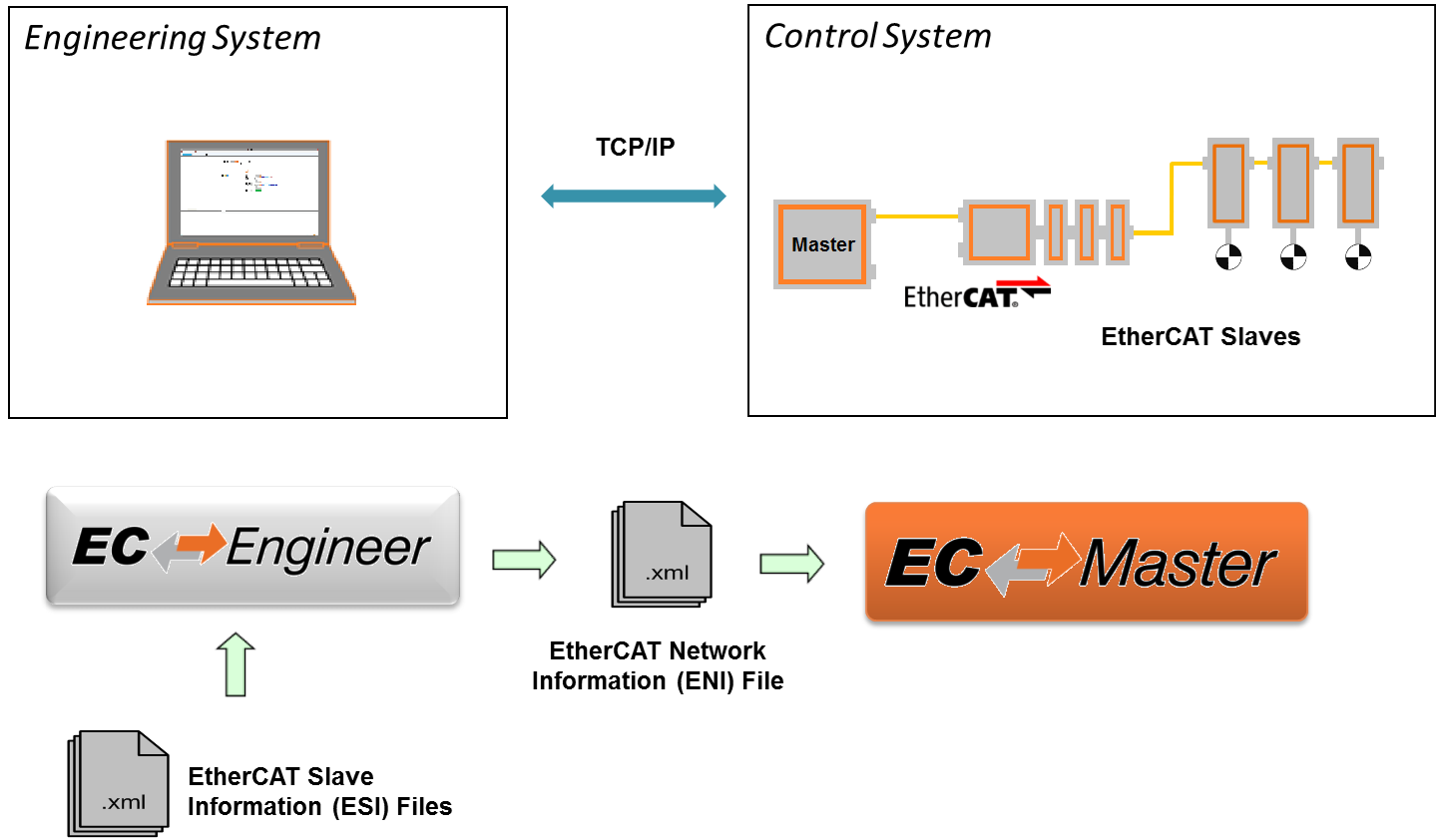
If he has the possibility to connect his Engineering System to the Control System, he can also scan his existing EtherCAT network. The EC-Engineer will then read the network configuration and add all slaves to the project explorer. Now the user can fine tune the network or directly export the ENI file.
If the control system is now running, he can connect to it by using the remote diagnosis functionality and verify that everything is fine by accessing the states, variables, object dictionaries, ESC registers EEPROM data.
1.2. Features
The following table shows the features of the EC-Engineer:
General features |
Feature ID |
Free |
Standard |
Plus |
|---|---|---|---|---|
Classic view |
100 |
✅ |
✅ |
✅ |
Flat view |
101 |
✅ |
✅ |
✅ |
Topology view |
102 |
✅ |
✅ |
✅ |
Multiple Instances |
103 |
✅ |
✅ |
✅ |
Different themes |
104 |
✅ |
✅ |
✅ |
Different Languages |
105 |
✅ |
✅ |
✅ |
Command line interface |
106 |
✅ |
✅ |
✅ |
EMI Manager |
107 |
✅ |
✅ |
✅ |
ESI Manager |
108 |
✅ |
✅ |
✅ |
Expert Mode |
109 |
✅ |
✅ |
✅ |
Edit topology view |
110 |
✅ |
✅ |
✅ |
Offline Diagnosis |
111 |
❌ |
✅ |
✅ |
Unlimited Slave Count |
112 |
❌ |
✅ |
✅ |
Configuration features |
Feature ID |
Free |
Standard |
Plus |
|---|---|---|---|---|
Set up distributed clocks |
200 |
✅ |
✅ |
✅ |
Configure MDP slaves |
201 |
✅ |
✅ |
✅ |
Custom PDO mapping |
202 |
✅ |
✅ |
✅ |
Changing name of variables |
203 |
✅ |
✅ |
✅ |
Group support / Hot Connect / Pinned Group |
204 |
✅ |
✅ |
✅ |
EoE Support |
205 |
✅ |
✅ |
✅ |
Startup Commands |
206 |
✅ |
✅ |
✅ |
CoE Object-Dictionary (offline) |
207 |
✅ |
✅ |
✅ |
Enable / disable slave |
208 |
✅ |
✅ |
✅ |
Slave to Slave |
209 |
✅ |
✅ |
✅ |
Support gateway slaves (EL6692, EL6224, EL6631-0010, …) |
210 |
✅ |
✅ |
✅ |
Export ENI-File |
211 |
❌ |
✅ |
✅ |
Export Process variables |
212 |
✅ |
✅ |
✅ |
Multiple Cyclic Tasks |
213 |
❌ |
✅ |
✅ |
Import slaves from ENI |
214 |
✅ |
✅ |
✅ |
SoE Object-Dictionary (offline) |
215 |
✅ |
✅ |
✅ |
Change revision of slave |
216 |
✅ |
✅ |
✅ |
Scan topology of local system |
217 |
✅ |
✅ |
✅ |
Scan topology of remote system |
218 |
❌ |
✅ |
✅ |
Scan PDO configuration from slave |
219 |
✅ |
✅ |
✅ |
Scan MDP configuration from slave |
220 |
✅ |
✅ |
✅ |
Define project templates |
221 |
❌ |
✅ |
✅ |
Support gateway masters (EL6751, EL6731, …) |
222 |
❌ |
✅ |
✅ |
EtherCAT P support |
223 |
✅ |
✅ |
✅ |
Slave to Slave in Cycle |
224 |
❌ |
✅ |
✅ |
Diagnosis features |
Feature ID |
Free |
Standard |
Plus |
|---|---|---|---|---|
Watch list with export |
300 |
✅ |
✅ |
✅ |
ESC Register |
301 |
✅ |
✅ |
✅ |
FoE support |
302 |
❌ |
✅ |
✅ |
DC Diagnosis |
303 |
✅ |
✅ |
✅ |
Extended Diagnosis |
304 |
✅ |
✅ |
✅ |
Trace Data Variables |
305 |
✅ |
✅ |
✅ |
EoE endpoint support |
306 |
❌ |
✅ |
✅ |
Export CoE Object-Dictionary |
307 |
✅ |
✅ |
✅ |
Local System with Windows Master |
308 |
✅ |
✅ |
✅ |
Remote System via RAS-Client |
309 |
❌ |
✅ |
✅ |
Reading count of slaves or frames |
310 |
✅ |
✅ |
✅ |
Compare configured and found slaves |
311 |
✅ |
✅ |
✅ |
See value of variables in a list view or chart view |
312 |
✅ |
✅ |
✅ |
Changing value of a variable |
313 |
✅ |
✅ |
✅ |
Reading/Writing values (CoE OD) |
314 |
✅ |
✅ |
✅ |
EEPROM Reading/Writing values |
315 |
❌ |
✅ |
✅ |
Reading error or frame counters |
316 |
✅ |
✅ |
✅ |
Diagnosis History of master or slave |
317 |
✅ |
✅ |
✅ |
Reading/Writing values (SoE OD) |
318 |
✅ |
✅ |
✅ |
1.3. Supported Slaves of Beckhoff EL6xxx
The following table shows the supported slaves of Beckhoff EL6xxx in the EC-Engineer:
Name |
Free |
Standard |
Plus |
|---|---|---|---|
EL6001 Interface (RS232) |
✅ |
✅ |
✅ |
EL6002 Interface 2Ch. (RS232) |
✅ |
✅ |
✅ |
EL6021 Interface (RS422/485) |
✅ |
✅ |
✅ |
EL6021-0021 Interface (RS422/485 line device) |
✅ |
✅ |
✅ |
EL6022 Interface 2Ch. (RS422/485) |
✅ |
✅ |
✅ |
EL6080 EtherCAT Memory Terminal (128kB) |
✅ |
✅ |
✅ |
EL6224 / EP6224 IO-Link Gateway |
✅ |
✅ |
✅ |
EP6228 / EPP6228 IO-Link Gateway |
✅ |
✅ |
✅ |
EL6601 1 Port Switch (Ethernet, CoE) |
✅ |
✅ |
✅ |
EL6614 4 Port Switch (Ethernet, CoE) |
✅ |
✅ |
✅ |
EL6631-0010 PROFINET IO Device |
✅ |
✅ |
✅ |
EL6690 EtherCAT Bridge terminal (Primary) |
✅ |
✅ |
✅ |
EL6690 EtherCAT Bridge terminal (Secondary) |
✅ |
✅ |
✅ |
EL6692 EtherCAT Bridge terminal (Primary) |
✅ |
✅ |
✅ |
EL6692 EtherCAT Bridge terminal (Secondary) |
✅ |
✅ |
✅ |
EL6695 EtherCAT Bridge terminal (Primary) |
✅ |
✅ |
✅ |
EL6695 EtherCAT Bridge terminal (Secondary) |
✅ |
✅ |
✅ |
EL6731 PROFIBUS DP Master |
❌ |
❌ |
✅ |
EL6731-0010 PROFIBUS DP Slave |
✅ |
✅ |
✅ |
EL6751 CANopen Master |
❌ |
❌ |
✅ |
EL6751-0010 CANopen Slave |
❌ |
❌ |
✅ |
Not listed devices are not supported.
1.4. Requirements
Microsoft Windows 10 and above
Microsoft .NET Framework 4 Client Profile
Screen resolution at least 1024x768 pixel
Memory as recommended for operating system
Disk space approximately 80 MB (depend on number of
ESIfiles)
1.5. EtherCAT Slave descriptions (ESI files)
The EC-Engineer needs information about each Slave Type to correctly initialize it, give reasonable default settings and present the configurable properties to the user. The knowledge about the different Slave types is gathered from ESI files. The ESI files can be managed by the ESI-Manager.