17. VxWorks Guest
17.1. Installation
To be able to configure the VxWorks OS and create own VxWorks binary images, the VxWorks hypervisor support files have to be copied into the VxWorks installation folder.
17.1.1. VxWorks 7 SR630
17.1.1.1. Create the VxWorks SR630 Source Build (VSB)
Based on Category: All
Based on: a VxWorks 7 board support package
Active CPU: Pentium4
Baseline: SR0630 2019-11-08
BSP: vxwin_generic_2_0_0_1
Processor mode: UP support in Libraries
VSB Profile: Development
17.1.1.2. Create the VxWorks SR630 Image Project (VIP)
Based on Category: All
Based on: a source build project
Profile: PROFILE_DEVELOPMENT
17.1.2. VxWorks7 2403
17.1.2.1. Create the VxWorks 2403 Source Build (VSB)
Based on Category: All
Based on a VxWorks board support package
BSP: itl_rthv_generic
Active CPU: Pentium4
VSB Profile: Minimal
17.1.2.2. Create the VxWorks 2403 Image Project (VIP)
Based on Category: All
Based on: a source build project
Profile: Development
17.2. VxWorks specific configuration parameters
Default settings are stored in guest.config file. User can override those setting in the usr.config file.
17.2.1. Network configuration
All network configuration parameters are stored in guest.config file under the [Rtos] key.
Entry Name |
Type |
Description |
|---|---|---|
Bootline |
String |
VxWorks boot line. |
Console |
String |
VxWorks device name which shall be used for the console interface |
VnetMACAddress |
String |
Virtual Network Adapter MAC address. |
VnetPollPeriod |
Dword |
Virtual Network Adapter polling period in timer ticks. |
0 enables interrupt mode. |
||
VnetNumCluster |
Dword |
Number of network clusters for the Virtual Network Adapter. |
AddNetworkX |
String |
Additional network interface where the IP stack shall be attached to. |
X==0 (AddNetwork0): first additional interface. |
||
X==1 (AddNetwork1): second additional interface. |
||
LogNetworkInterfaceX |
String |
Network interface for which the network packet logger shall be enabled. |
X==0 (LogNetworkInterface0): first interface for packet capturing. |
||
X==1 (LogNetworkInterface1): second interface for packet capturing. |
||
LogNetworkFileX |
String |
File where the network packet log shall be stored. |
X==0 (LogNetworkFile0), X==1 (LogNetworkFile1), etc. |
||
LogNetworkFileMaxSizeX |
Dword |
Maximum capture file size in kByte. X corresponds to the specific file. |
17.2.1.1. Bootline
[rtos] key:[rtos]"Bootline" = "vnet(0,2)pc:vxWorks h=192.168.0.1 e=192.168.0.2 u=target pw=vxworks"17.2.1.2. Console
[Rtos]"Console"="/vio/0""/tyCo/0"17.2.1.3. VnetMACAddress
"AA-BB-CC-DD-EE-02"17.2.1.4. VnetPollPeriod
"VnetPollPeriod" = "time units"17.2.1.5. VnetNumCluster
"VnetNumCluster" = "size"17.2.1.6. AddNetworkX
[rtos]"AddNetwork0"="fei0:192.168.100.1:255.255.255.0"17.2.1.7. LogNetworkXxx
[rtos]"LogNetworkInterfaceX" = "interface name""LogNetworkFileX" = "filename""LogNetworkFileMaxSizeX" = "max size in kBytes"17.3. Filesystem access via FTP
The filesystem of the hypervisor can be accessed via FTP. You need to adjust the VxWorks bootline so it matches the username and password of the hypervisor.
You may use the shell commands to verify if FTP access works:
cd "/host.pc"
ls
17.4. Filesystem access via NFS
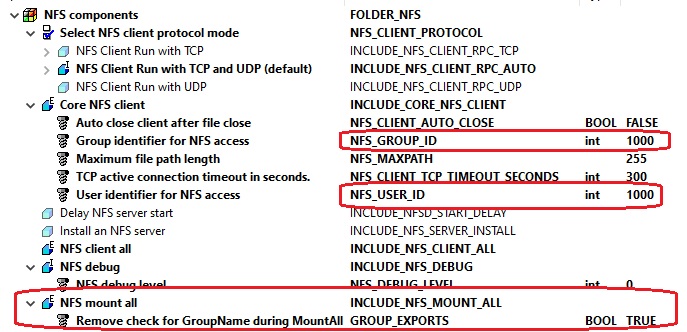
An alternative to the FTP file access is using NFS. In a first step, the NFS server must be installed in the Hypervisor host, see NFS access The VxWorks image then must include NFS client support.
You will have to determine the UID and GID of the folder that is exported.
In this example, we assume the /hv/guests folder is exported.
cd /hv
ls -ldn guests
The resulting output will show the UID and GID of the folder:
drwxr-xr-x 12 1000 1000 4096 Mai 23 19:53 .
The first column drwxr-xr-x represents the permissions of the folder.
The second column 12 is the number of hard links.
The third column 1000 is the UID of the folder owner.
The fourth column 1000 is the GID of the group owner.
In VxWorks, network authentication can be set then using nfsAuthUnixSet. The following example will use the host name pc which is determined in the bootline and the UID/GID determined before:
nfsAuthUnixSet("pc",1000,1000,0,0)
Using the nfsMount call a NFS share can be mounted:
nfsMount("pc","/hv/guests","/guests")
Alternatively, you can configure the VIP (VxWorks Image Project) to mount all available NFS shares automatically using the appropriate UID/GID values.
17.5. Autostart
You can place a startup script (e.g. startup.sh) in the guests sub folder files, e.g. into /hv/guests/guest0001/files.
Then you need to add the s=/host.pc/hv/guests/guest0001/files/startup.sh parameter into the bootline (stored in guest.config in the guest folder).
This startup script then may load additional object modules and run an application. An example script may look as follows:
cd "/host.pc/hv/guests/guest0001/files"
ld<objmodule1.out
ld<objmodule2.out
sp myApp
17.6. RTOS Library
The RTOS library provides higher-level communication services for synchronizing Windows with VxWorks or to exchange data between the operating systems. The RTOS library is based on VMF-functions, which provide the basic communication functionality. A description of the RTOS Library can be found in the document RtosVM User Manual (see the acontis online Development Center and look for the VxWin manuals).