
1.2. Configuration with EC-Engineer
The EC-Engineer automatically chooses the DC settings for SubDevices as proposed by the device’s vendor and sets DCM mode to bus shift.
The settings can be changed according to the project’s needs. DC options are part of the EC-Engineer Expert Mode. The Expert Mode can be activated from the menu:

1.2.1. Distributed Clocks MainDevice settings (Expert)
In this tab, the user can change distributed clocks related settings. The tab is only available if the configuration contains SubDevices.
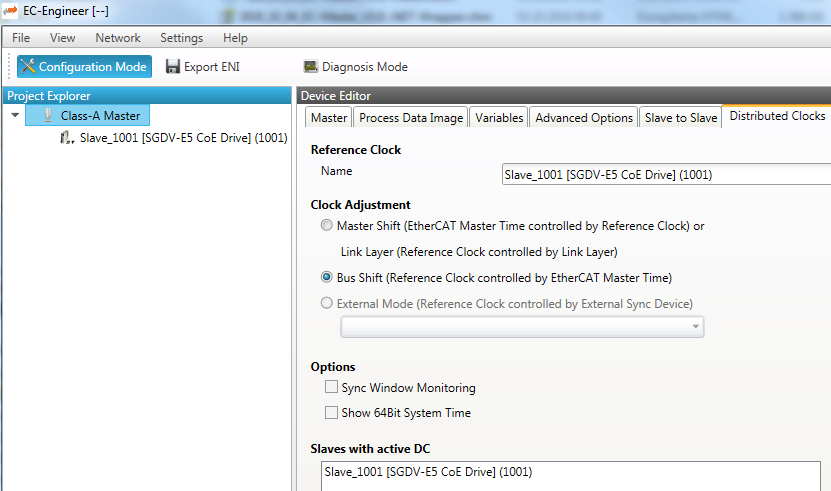
Reference Clock Name: Name of the reference clock. By default, this is the first SubDevice with DC support.
MainDevice Shift: The reference clock controls the MainDevice time
Bus Shift: The MainDevice time controls the reference clock. A command will be inserted in the Cyclic frame to adjust the reference clock system time (write to register 0x0910).
Continuous Propagation Compensation: A command will be inserted in the Cyclic frame which allows the EtherCAT® MainDevice to measure and compensate the propagation delay time by time.
Sync Window Monitoring: A command will be inserted in the cyclic frame to read the ESC registers 0x092C. If this is selected the MainDevice will throw a notification.
Show 64Bit System Time: MainDevice supports SubDevices with 32bit and 64bit system time register (0x0910). If this is selected he will interpret it as 64bit system time.
Note
If no reference clock is displayed, please ensure at least one SubDevice in the network is configured for DC operation mode Distributed Clocks SubDevice settings (Expert)
1.2.2. Distributed Clocks SubDevice settings (Expert)
In this tab, the user can change distributed clocks related settings. The tab is only available if the vendor of the device specified the DC usage. Sync signal generation or DC latching is selected automatically according to Operation Mode.

Operation Mode: Selectable DC operation modes. The modes cannot be edited.
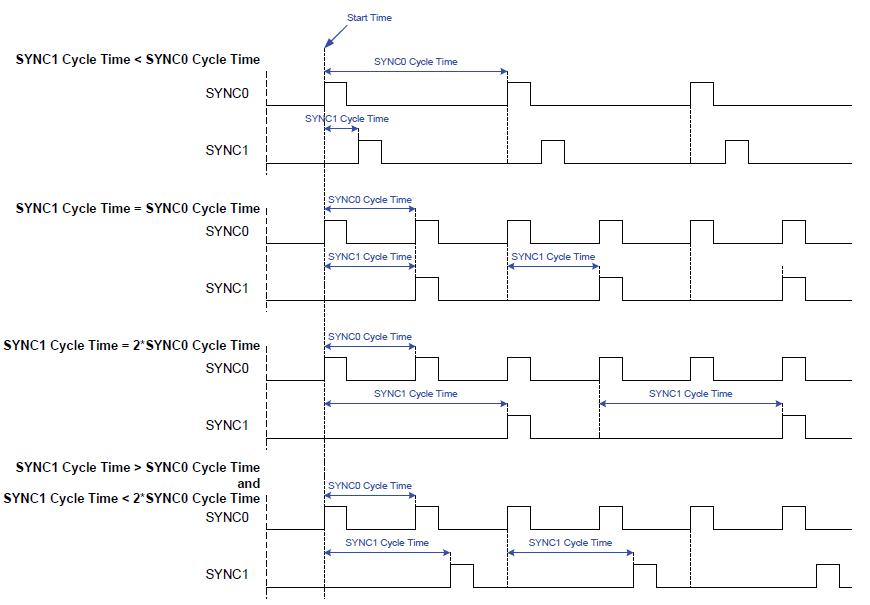
Sync Unit Cycle: Base interval in microseconds which will be used from MainDevice. The Sync Units can be activated and configured to generate signals.
See also
SyncSignal Generation in the ET1100 Datasheet for time describing