

2.2. Configuration with ET9000
Since version 2.11.0 of the EtherCAT® Configurator from Beckhoff explicitly setup whether the DC time shall be controlled by the EC-Master or not.
To create a DCM capable configuration, please accomplish the following steps.
Scan the EtherCAT® Bus
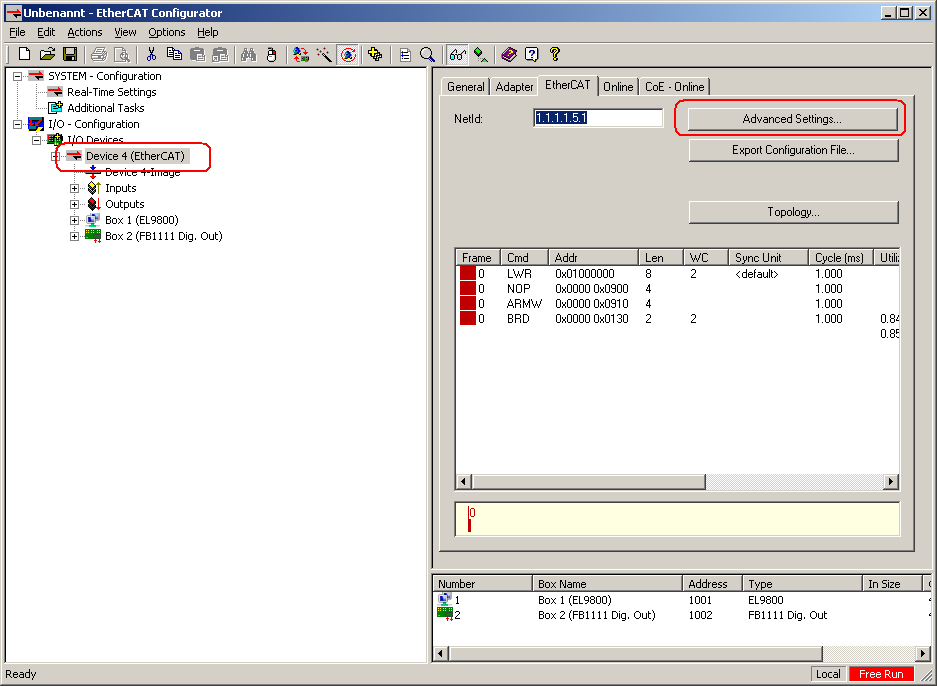
Select the EtherCAT® network adapter and press the button “Advanced Settings…”
In the open dialog please select “Distributed Clocks” on the left column. Then de-select “Automatic DC Mode Selection” and select the option “DC Time controlled by TwinCAT Time (SubDevice Mode)”.

Now the DC time can be controlled by the EC-Master.
Note
Don’t forget to enable DC for the SubDevices.