

6.6. Diagnosis
EtherCAT® offers comprehensive diagnostic capabilities at both hardware and software levels. Errors that can impact a network can be classified into two main categories:
- Hardware errors
Interruptions in the physical medium or unexpected changes in network topology, resulting in frames not reaching all network SubDevices or failing to return to the MainDevice. Examples include damaged cables, loose contacts, or SubDevice resets during operation.
All SubDevices are reached by frames, but the correct bit sequence is corrupted. Caused by factors such as electromagnetic disturbances or faulty devices.
- Software errors
Incorrect or mismatched parameters sent by the MainDevice during the start-up phase, failing to meet SubDevice expectations. This may include errors in process data size/configuration or unsupported cycle times.
Previously error-free SubDevices detecting issues during operation, such as synchronization loss or watchdog expiration.
These errors can be diagnosed cyclically or acyclically.
6.6.1. Working Counter
Every datagram within an EtherCAT® frame ends with a 16-bit Working Counter (WKC), which increments for each SubDevice that the datagram addresses.
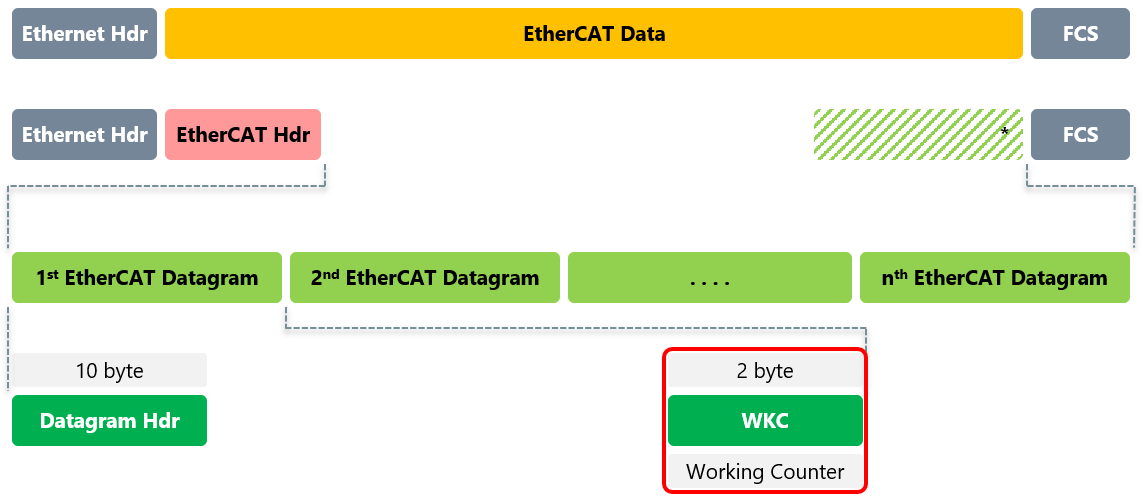
The Working Counter is always received by the EC-Monitor together with the corresponding datagram, and enables therefore an immediate reaction in case of invalid or inconsistent data. The information regarding the Working Counter is essentially digital (WKC correct vs. WKC invalid), and does not differentiate between various error causes. An invalid WKC can result from several situations:
One or more SubDevices are not physically connected to the network, or they are not reached by the frames.
One or more SubDevices have been reset.
One or more SubDevices are not in the Operational state.
If a datagram returns to the EC-Monitor with an unexpected WKC, the EC-Monitor discards the input data carried by that datagram. The application will be informed by an emonNotify - EC_NOTIFY_CYCCMD_WKC_ERROR notification.
In addition to notification, it is also possible to evaluate the WKC states of the individual SubDevices and their process data sections. The following example demonstrates how to evaluate the WKC state of the SubDevice inputs:
EC_T_BYTE* pbyDiagnosisImage = emonGetDiagnosisImagePtr(dwInstanceId);
EC_T_CFG_SLAVE_INFO CfgSlaveInfo;

dwRes = emonGetCfgSlaveInfo(dwInstanceId, EC_TRUE, 1002, &CfgSlaveInfo);

for (EC_T_DWORD i = 0; i < EC_CFG_SLAVE_PD_SECTIONS; i++)
{
    if (0xFFFF == CfgSlaveInfo.wWkcStateDiagOffsIn[i])
    {
        /* offset not available */
        break;
    }

    if (EC_TESTBIT(pbyDiagnosisImage, CfgSlaveInfo.wWkcStateDiagOffsIn[i]))
    {
        /* ... error ... */
    }
}
6.6.2. MainDevice Sync Units
EtherCAT® configurators can optionally group network SubDevices into disjoint subsets called MainDevice Sync Units. SubDevices in different MainDevice Sync Units are served by separate datagrams and are thus independent from each other in terms of Working Counter diagnostics.
The following example demonstrates how to evaluate the WKC state of the MainDevice Sync Unit 0:
EC_T_BYTE* pbyDiagnosisImage = emonGetDiagnosisImagePtr(dwInstanceId);
EC_T_MSU_INFO MsuInfo;

dwRes = emonGetMasterSyncUnitInfo(dwInstanceId, 0, &MsuInfo);

if (EC_TESTBIT(pbyDiagnosisImage, MsuInfo.wWkcStateDiagOffsIn))
{
    /* ... error ... */
}