
8.4. Windows WinPcap - emllPcap
An Ethernet Driver based on the WinPcap library is shipped with the EC-Monitor. This Ethernet Driver is implemented using a network filter driver that enables the software to send and receive raw Ethernet frames. Using this Ethernet Driver any Windows standard network drivers can be used. The Windows network adapter card has to be assigned a unique IP address (private IP address range). This IP address is used by the EtherCAT® WinPcap Ethernet Driver driver to select the appropriate adapter.
It is recommended to use a separate network adapter to connect EtherCAT® devices. If the network adapter is used for both EtherCAT® and the local area network, it may significantly impact local area network operation. A static private IP address (e.g., 192.168.x.y) must be assigned to the EtherCAT® network adapter.
The parameters to the Ethernet Driver WinPcap are setup-specific. The function CreateLinkParmsFromCmdLineWinPcap() in EcSelectLinkLayer.cpp demonstrates how to initialize the Ethernet Driver instance.
-
struct EC_T_LINK_PARMS_WINPCAP
Public Members
-
EC_T_LINK_PARMS linkParms
Common link parameters. Signature must be set to EC_LINK_PARMS_SIGNATURE_WINPCAP.
-
EC_T_BYTE abyIpAddress[4]
IP address
-
EC_T_CHAR szAdapterId[MAX_LEN_WINPCAP_ADAPTER_ID]
Adapter ID, format: {XXXXXXXX-XXXX-XXXX-XXXX-XXXXXXXXXXXX}
-
EC_T_BOOL bFilterInput
Filter input if EC_TRUE. This is needed on some system if the winpcap library notify the sent frames to the network adapter.
-
EC_T_LINK_PARMS linkParms
8.4.1. WinPcap, Npcap support
At least WinPcap version 4.1.2 or Npcap 0.07 r17 must be used. WinPcap version 4.1.2 is the preferred library.
The EC-Monitor installer installs WinPcap by default.
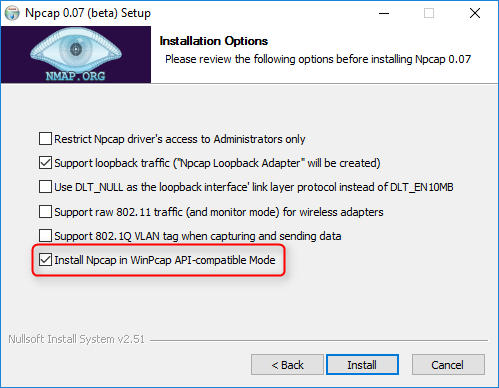
If using Npcap 0.07 r17, the WinPcap API-compatible mode must be chosen: