

5.1. Running EcMonitorDemo
To capture the EtherCAT® traffic insert a TAP device between the EtherCAT® adapter of the MainDevice and the first SubDevice.
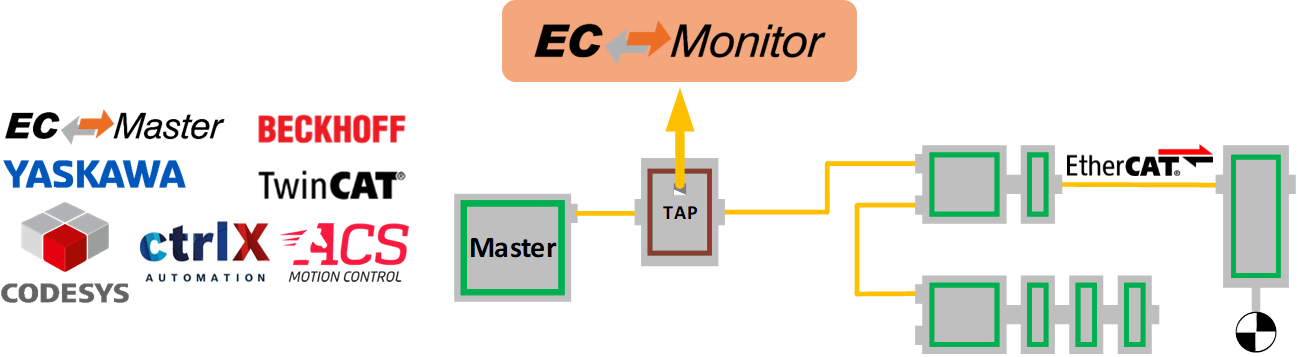
Start the EcMonitorDemo from the command line to process the captured EtherCAT® frames. At least a Real-time Ethernet Driver and a ENI file must be specified.
> EcMonitorDemo -ndis 192.168.157.2 1 -f eni.xml -t 0 -v 3
See also
Platform and Operating Systems (OS) for OS specific additional instructions to run the demo application
5.1.1. Command line parameters
- EcMonitorDemo <LinkLayer> [-f ENI-FileName] [-t time] [-b cycle time] [-a affinity] [-v level] [-perf] [-log prefix [msg cnt]] [-lic key] [-sp [port]] [-rec [prefix]] [-play pcap-FileName] [-daqrec file name]
The parameters are as follows:
- -t <time>
Running duration [ms]. When the time expires the demo application exits completely.
- <time>:
Time [ms], 0 = forever (default = 120000)
- -b <cycle time>
Specifies the bus cycle time. Defaults to 1000 µs (1 ms).
- <cycle time>:
Bus cycle time in µsec
- -a <affinity>
The CPU affinity specifies which CPU the demo application ought to use.
- <affinity>:
0 = first CPU, 1 = second, …
- -v <level>
The verbosity level specifies how much console output messages will be generated by the demo application. A high verbosity level leads to more messages.
- <level>:
Verbosity level: 0=off (default), 1..n=more messages
- -perf [<level>]
Enable max. and average time measurement in µs for all EtherCAT® jobs (e.g. ProcessAllRxFrames).
- <level>:
Depending on level the performance histogram can be activated as well.
- -log <prefix> [<msg cnt>]
Use given file name prefix for log files.
- <prefix>:
- <msg cnt>:
Messages count for log buffer allocation
- -sp [<port>]
If platform has support for IP Sockets, this command-line option enables the Remote API Server to be started. The Remote API Server is going to listen on TCP Port 6000 (or port parameter if given) and is available for connecting Remote API Clients.
- <port>:
RAS server port
- -mqtt <BrokerAddress>
Publish process data to MQTT broker. EcMonitorDemoMqtt only
- <BrokerAddress>:
MQTT broker address
- -mqttCycTime <Msec>
Minimum time between cyclic messages for a variable. EcMonitorDemoMqtt only
- <Msec>:
Time in milliseconds
- -mqttChgTime <Msec>
Minimum time between change-detection based messages for a variable. EcMonitorDemoMqtt only
- <Msec>:
Time in milliseconds
5.1.1.1. Link Layer
Using one of the following demo application Link Layer options, the EC-Monitor will dynamically load the network driver for the specified network adapter card and use the appropriate network driver to access the Ethernet adapter for EtherCAT®.
ShowSyntaxLinkLayer() in Common/EcSelectLinkLayer.cpp is called automatically if the Demo application is started without parameters and lists the possibilities.
Note
Not all link layers are available on all operating systems or architectures. A detailed view in the form of a matrix can be found in the developer center.
- -intelgbe <instance> <mode> [--tts <sendoffset>|--tmr] [--nophyctrlonconnect]
- Hardware: Intel Pro/1000 network adapter card
- <Instance>:
Device instance 1 = first, 2 = second, …
- <Mode>:
0 = Interrupt mode | 1 = Polling mode
- Optional:
- --tts:
Enable Real-time Ethernet Driver Time Triggered Send (TTS)
- <SendOffset>:
TTS cyclic frame send offset from cycle start (usec)
- or:
- --tmr:
Enable Real-time Ethernet Driver Timer
- Optional:
- --nophyctrlonconnect:
Disable PHY control (e.g. PHY reset, PHY PM settings, Gbits Ctrl) on link connection detected
- -ndis <ipaddress> <mode> [--name <adaptername>] [--disablepromiscuousmode] [--disableforcebroadcast]
- Hardware: Hardware independent, only available for Windows.
- <IpAddress>:
IP address of network adapter card, e.g. 192.168.157.2 or 0.0.0.0 if name given
- <Mode>:
0 = Interrupt mode | 1 = Polling mode
- Optional:
- --name:
Select network adapter by name
- <AdapterName>:
Service name from HKEY_LOCAL_MACHINE\SOFTWARE\Microsoft\Windows NT\CurrentVersion\NetworkCards
- Optional:
- --disablepromiscuousmode:
Disable promiscuous mode
- Optional:
- --disableforcebroadcast:
Disable force broadcast
- -remote <instance> <mode> <src ip> <src port> <dst ip> <dst port> [--mac <address>] [--rxbuffercnt <count>]
Hardware: Hardware independent. Tunnels EtherCAT frames through a TCP socket
- <Instance>:
Device instance 1 = first, 2 = second, …
- <Mode>:
1 = Polling mode
- <Src ip>:
Source adapter IP address (listen)
- <Src port>:
Source port number (listen)
- <Dst ip>:
Destination adapter IP address (connect)
- <Dst port>:
Destination port number (connect)
- Optional:
- --mac:
MAC Address
- <Address>:
formatted as xx:xx:xx:xx:xx:xx or xx-xx-xx-xx-xx-xx
- Optional:
- --rxbuffercnt:
Frame buffer count for interrupt service thread (IST)
- <Count>:
Buffer count
- -snarf <adaptername>
- Hardware: Hardware independent, only available for VxWorks
- <AdapterName>:
Adapter name, e.g. fei0
- -sockraw <device> [<mode>] [--nommaprx] [--promiscuousmode]
- Hardware: Hardware independent, only available for Linux.
- <Device>:
Network adapter, e.g. eth1
- Optional:
- <Mode>:
0 = Interrupt mode | 1 = Polling mode
- Optional:
- --nommaprx:
Disable PACKET_MMAP for receive
- Optional:
- --promiscuousmode:
Enable promiscuous mode