
3.5. Process Data Access
The process data is exchanged as variables between the EtherCAT® MainDevice and the SubDevices with EtherCAT® commands every cycle.
The MainDevice Memory contains the Process Data Image separated in two memory areas, one for input data and another one for output data:
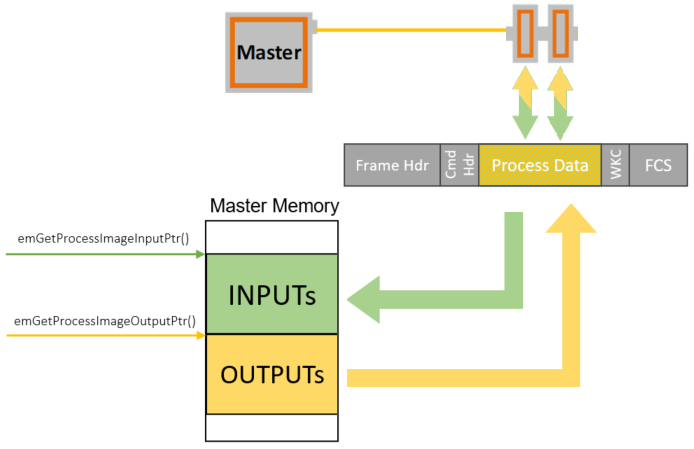
The base addresses of these areas are provided by calling the functions emGetProcessImageInputPtr() and emGetProcessImageOutputPtr().
The size of the Process Data Image INPUT/OUTPUT areas as defined in the ENI file under EtherCATConfig/Config/ProcessImage/Inputs/ByteSize and EtherCATConfig/Config/ProcessImage/Outputs/ByteSize is returned by emRegisterClient() at EC_T_REGISTERRESULTS::dwPDOutSize and EC_T_REGISTERRESULTS::dwPDInSize.
All INPUT and OUTPUT process data variables are mapped and contained in the Process Data Image:
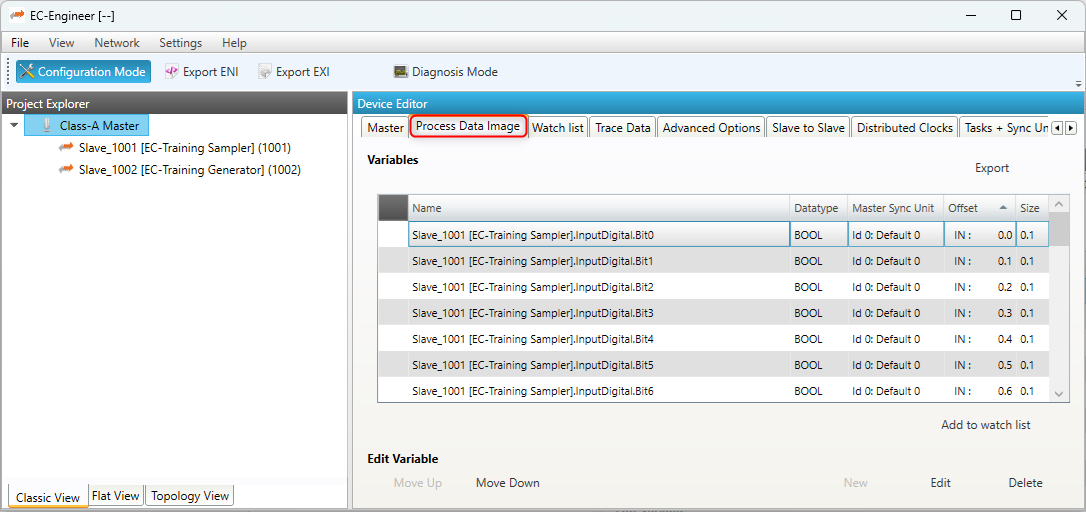
The information about variables is loaded from the ENI file using emConfigureNetwork():
/* load ENI */
const EC_T_CHAR* szFileName = "eni.xml";
dwRes = emConfigureNetwork(dwInstanceId, eCnfType_Filename,
    (EC_T_BYTE*)szFileName, (EC_T_DWORD)OsStrlen(szFileName));
To get the list of all variables, the example application EcMasterDemo can be started with command line option -printvars, see Running EcMasterDemo.
It demonstrates the usage of the functions emGetSlaveInpVarInfoEx() and emGetSlaveOutpVarInfoEx().
Sizes of EtherCAT® variables are given as bit length, not byte length and their offset within the Process Data Image are given as bit offsets, not byte offsets.
Due to padding bits within the Process Data Objects (PDOs) defined in the EtherCAT® SubDevice description (ESI file) and the calculation algorithms within the configuration tool, process data variables are typically starting at a byte boundary.
The structure of the process data image is read from the ENI file. It includes all offsets of all process data variables and does not change until a new configuration is provided.
Lookup of variables is therefor only needed once after loading the network configuration (ENI) and is not needed every cycle.
In the example program it can be integrated in myAppPrepare() at application startup.
All variable names are stored in the ENI file under EtherCATConfig/Config/ProcessImage/[Inputs|Outputs]/Variable.
Application-specific working on process data is supposed to be integrated in myAppWorkPd() .
Different ways to lookup information of variables using the parsed information from the ENI by the EC-Master stack in myAppPrepare()
and application-specific working on process data in myAppWorkPd() are described in this chapter below.
3.5.1. Process data access using hard coded offsets
The configuration tool assigns the offset and size of each variable within the Process Data Image:

The following example demonstrates how to access the variables with hard coded bit offsets in myAppWorkPd().
Process data access using hard coded offsets example
static EC_T_DWORD myAppWorkpd(T_EC_DEMO_APP_CONTEXT* pAppContext)
{
    EC_T_DWORD dwInstanceId = pAppContext->dwInstanceId;
    EC_T_BYTE* pbyPdIn = emGetProcessImageInputPtr(dwInstanceId);
    EC_T_BYTE* pbyPdOut = emGetProcessImageOutputPtr(dwInstanceId);

    /* Slave_1002 [EC-Training Generator].Counter1.Value (Offset: 9.0) */
    EC_T_SDWORD sdwCounter1_Value = EC_GET_FRM_DWORD(&pbyPdIn[9 /* 9.0 */]);
    EcLogMsg(EC_LOG_LEVEL_INFO, (pEcLogContext, EC_LOG_LEVEL_INFO,
        "Counter1.Value: %d\n", sdwCounter1_Value));

    /* Slave_1002 [EC-Training Generator].Counter1.Enable (Offset: 11.0) */
    EC_T_BYTE byCounter1_Enable = 1;
    EC_COPYBIT(&pbyPdOut[11], 0 /* 11.0 */, byCounter1_Enable);

    /* Slave_1002 [EC-Training Generator].Counter1.Increment (Offset: 9.0) */
    EC_T_SWORD swCounter1_Increment = 100;
    EC_SET_FRM_WORD(&pbyPdIn[9 /* 9.0 */], swCounter1_Increment);

    return EC_E_NOERROR;
}
Note
The offsets are subject to be changed if the ENI file changes. It is strongly recommended to determine the bit offsets of variables on startup as described in the following chapters instead of using hard coded values!
3.5.2. Process data access using variable names from ENI
Using the configuration tool, unique names can be assigned to Process Data variables. They are included in the ENI file.
Note
The variable name parameter to emFindOutpVarByNameEx() / emFindInpVarByNameEx() must match the variable name in the ENI file. The variable names of each SubDevice are taken from the ESI file and can be changed using the configuration tool.
The following example demonstrates how to query the bit offset of a variable by its name from the EC-Master stack using emFindOutpVarByNameEx(), emFindInpVarByNameEx().
Process data access using variable names from ENI example
struct _T_MY_APP_DESC;
typedef struct _T_EC_DEMO_APP_CONTEXT
{
    T_EC_DEMO_APP_PARMS    AppParms;
    EC_T_LOG_PARMS         LogParms;
    EC_T_DWORD             dwInstanceId;
    struct _T_MY_APP_DESC* pMyAppDesc;
} T_EC_DEMO_APP_CONTEXT;

typedef struct _T_MY_APP_DESC
{
    EC_T_PROCESS_VAR_INFO_EX aoProcVarInfo[3];
} T_MY_APP_DESC;

static EC_T_DWORD myAppPrepare(T_EC_DEMO_APP_CONTEXT* pAppContext)
{
    EC_T_DWORD dwRetVal = EC_E_NOERROR;
    EC_T_DWORD dwInstanceId = pAppContext->dwInstanceId;
    T_MY_APP_DESC* pMyAppDesc = pAppContext->pMyAppDesc;
    EC_T_PROCESS_VAR_INFO_EX* aoProcVarInfo = pMyAppDesc->aoProcVarInfo;

    OsMemset(pMyAppDesc->aoProcVarInfo, 0, sizeof(pMyAppDesc->aoProcVarInfo));

    dwRetVal = emFindInpVarByNameEx(dwInstanceId, "Slave_1002 [EC-Training Generator].Counter1.Value", &aoProcVarInfo[0]);
    if (EC_E_NOERROR != dwRetVal)
        return dwRetVal;

    dwRetVal = emFindOutpVarByNameEx(dwInstanceId, "Slave_1002 [EC-Training Generator].Counter1.Enable", &aoProcVarInfo[1]);
    if (EC_E_NOERROR != dwRetVal)
        return dwRetVal;

    dwRetVal = emFindOutpVarByNameEx(dwInstanceId, "Slave_1002 [EC-Training Generator].Counter1.Increment", &aoProcVarInfo[2]);
    if (EC_E_NOERROR != dwRetVal)
        return dwRetVal;

    return EC_E_NOERROR;
}
static EC_T_DWORD myAppWorkpd(T_EC_DEMO_APP_CONTEXT* pAppContext)
{
    EC_T_DWORD dwInstanceId = pAppContext->dwInstanceId;
    T_MY_APP_DESC* pMyAppDesc = pAppContext->pMyAppDesc;
    EC_T_PROCESS_VAR_INFO_EX* aoProcVarInfo = pMyAppDesc->aoProcVarInfo;

    EC_T_BYTE* pbyPdIn = emGetProcessImageInputPtr(dwInstanceId);
    EC_T_BYTE* pbyPdOut = emGetProcessImageOutputPtr(dwInstanceId);

    /* Slave_1002 [EC-Training Generator].Counter1.Value (Offset: 9.0) */
    EcLogMsg(EC_LOG_LEVEL_INFO, (pEcLogContext, EC_LOG_LEVEL_INFO,
        "Counter1.Value: %d\n", EC_GET_FRM_DWORD(&pbyPdIn[aoProcVarInfo[0].nBitOffs / 8])));

    /* Slave_1002 [EC-Training Generator].Counter1.Enable (Offset: 11.0) */
    EC_SETBIT(pbyPdOut, aoProcVarInfo[1].nBitOffs);

    /* Slave_1002 [EC-Training Generator].Counter1.Increment (Offset: 9.0) */
    EC_SET_FRM_WORD(&pbyPdOut[aoProcVarInfo[2].nBitOffs / 8], 100);

    return EC_E_NOERROR;
}
3.5.3. Process data access using variable object index from ENI
The variable offsets can be determined dynamically using the object index and subindex with the functions emGetSlaveInpVarByObjectEx() or emGetSlaveOutpVarByObjectEx().
The “PDO Mapping” tab in EC-Engineer shows the Object Index and SubIndex for each variable:
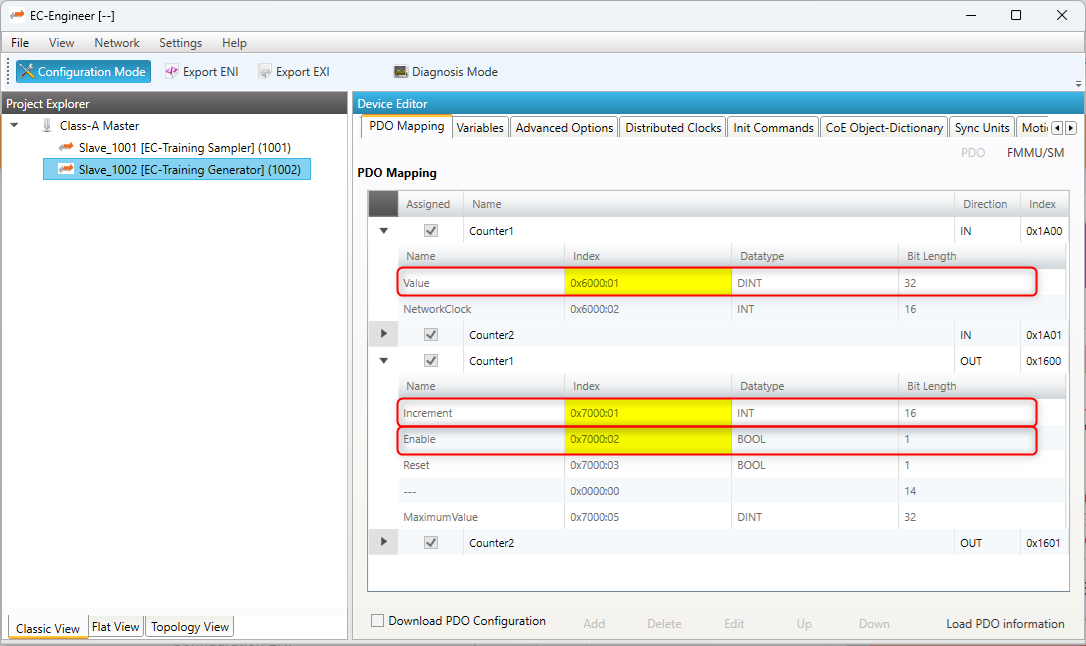
The following example demonstrates how to query the bit offset of a variable by its Process Data variable Object Index and SubIndex from the EC-Master stack using emGetSlaveOutpVarByObjectEx(), emGetSlaveInpVarByObjectEx().
Process data access using variable object index from ENI example
struct _T_MY_APP_DESC;
typedef struct _T_EC_DEMO_APP_CONTEXT
{
    T_EC_DEMO_APP_PARMS    AppParms;
    EC_T_LOG_PARMS         LogParms;
    EC_T_DWORD             dwInstanceId;
    struct _T_MY_APP_DESC* pMyAppDesc;
} T_EC_DEMO_APP_CONTEXT;

typedef struct _T_MY_APP_DESC
{
    EC_T_PROCESS_VAR_INFO_EX aoProcVarInfo[3];
} T_MY_APP_DESC;

static EC_T_DWORD myAppPrepare(T_EC_DEMO_APP_CONTEXT* pAppContext)
{
    EC_T_DWORD dwRetVal = EC_E_NOERROR;
    EC_T_DWORD dwInstanceId = pAppContext->dwInstanceId;
    T_MY_APP_DESC* pMyAppDesc = pAppContext->pMyAppDesc;
    EC_T_PROCESS_VAR_INFO_EX* aoProcVarInfo = pMyAppDesc->aoProcVarInfo;

    OsMemset(pMyAppDesc->aoProcVarInfo, 0, sizeof(pMyAppDesc->aoProcVarInfo));

    /* Slave_1002 [EC-Training Generator].Counter1.Value (Object 0x6000:01) */
    dwRetVal = emGetSlaveInpVarByObjectEx(dwInstanceId, EC_TRUE, 1002, 0x6000, 1, &aoProcVarInfo[0]);
    if (EC_E_NOERROR != dwRetVal)
        return dwRetVal;

    /* Slave_1002 [EC-Training Generator].Counter1.Enable (Object 0x7000:01) */
    dwRetVal = emGetSlaveOutpVarByObjectEx(dwInstanceId, EC_TRUE, 1002, 0x7000, 1, &aoProcVarInfo[1]);
    if (EC_E_NOERROR != dwRetVal)
        return dwRetVal;

    /* Slave_1002 [EC-Training Generator].Counter1.Increment (Object 0x7000:02) */
    dwRetVal = emGetSlaveOutpVarByObjectEx(dwInstanceId, EC_TRUE, 1002, 0x7000, 2, &aoProcVarInfo[2]);
    if (EC_E_NOERROR != dwRetVal)
        return dwRetVal;

    return EC_E_NOERROR;
}
static EC_T_DWORD myAppWorkpd(T_EC_DEMO_APP_CONTEXT* pAppContext)
{
    EC_T_DWORD dwInstanceId = pAppContext->dwInstanceId;
    T_MY_APP_DESC* pMyAppDesc = pAppContext->pMyAppDesc;
    EC_T_PROCESS_VAR_INFO_EX* aoProcVarInfo = pMyAppDesc->aoProcVarInfo;

    EC_T_BYTE* pbyPdIn = emGetProcessImageInputPtr(dwInstanceId);
    EC_T_BYTE* pbyPdOut = emGetProcessImageOutputPtr(dwInstanceId);

    /* Slave_1002 [EC-Training Generator].Counter1.Value (Object 0x6000:01) */
    EcLogMsg(EC_LOG_LEVEL_INFO, (pEcLogContext, EC_LOG_LEVEL_INFO,
        "Counter1.Value: %d\n", EC_GET_FRM_DWORD(&pbyPdIn[aoProcVarInfo[0].nBitOffs / 8])));

    /* Slave_1002 [EC-Training Generator].Counter1.Enable (Object 0x7000:01) */
    EC_SETBIT(pbyPdOut, aoProcVarInfo[1].nBitOffs);

    /* Slave_1002 [EC-Training Generator].Counter1.Increment (Object 0x7000:02) */
    EC_SET_FRM_WORD(&pbyPdOut[aoProcVarInfo[2].nBitOffs / 8], 100);

    return EC_E_NOERROR;
}
3.5.4. Process data access using SubDevice station address
Based on the unique station address of a specific SubDevice the base offset of INPUTs and OUTPUTs can be determined using emGetCfgSlaveInfo().
The offsets are stored in EC_T_CFG_SLAVE_INFO::dwPdOffsIn and EC_T_CFG_SLAVE_INFO::dwPdOffsOut:
The following example demonstrates how to query the bit offset of a SubDevice’s process data by its station address from the EC-Master stack using emGetCfgSlaveInfo() .
Process data access using SubDevice station address example
static EC_T_DWORD myAppPrepare(T_EC_DEMO_APP_CONTEXT* pAppContext)
{
    EC_T_DWORD dwRetVal       = EC_E_NOERROR;
    EC_T_DWORD dwInstanceId   = pAppContext->dwInstanceId;
    T_MY_APP_DESC* pMyAppDesc = pAppContext->pMyAppDesc;
    OsMemset(pMyAppDesc->aSlaveList, 0, sizeof(pMyAppDesc->aSlaveList));

    dwRetVal = emGetCfgSlaveInfo(dwInstanceId, EC_TRUE, 1001, &pMyAppDesc->aSlaveList[0]);
    if (EC_E_NOERROR != dwRetVal)
        return dwRetVal;

    dwRetVal = emGetCfgSlaveInfo(dwInstanceId, EC_TRUE, 1002, &pMyAppDesc->aSlaveList[1]);
    if (EC_E_NOERROR != dwRetVal)
        return dwRetVal;

    return EC_E_NOERROR;
}
static EC_T_DWORD myAppWorkpd(T_EC_DEMO_APP_CONTEXT* pAppContext)
{
    EC_T_DWORD dwInstanceId = pAppContext->dwInstanceId;
    T_MY_APP_DESC* pMyAppDesc = pAppContext->pMyAppDesc;

    EC_T_BYTE* pbyPdIn = emGetProcessImageInputPtr(dwInstanceId);
    EC_T_BYTE* pbyPdOut = emGetProcessImageOutputPtr(dwInstanceId);

    /* Slave_1002 [EC-Training Generator].Counter1.Value (first INPUT variable) */
    EC_T_SDWORD* psdwCounter1Value = (EC_T_SDWORD*)&(pbyPdIn[pMyAppDesc->aSlaveList[1].dwPdOffsIn / 8]);

    EcLogMsg(EC_LOG_LEVEL_INFO, (pEcLogContext, EC_LOG_LEVEL_INFO,
        "Counter1.Value: %d\n", EC_GET_FRM_DWORD(psdwCounter1Value)));

    /* Slave_1002 [EC-Training Generator].Counter1.Increment (first OUTPUT variable) */
    EC_T_SWORD* pswCounter1Increment = (EC_T_SWORD*)&(pbyPdOut[pMyAppDesc->aSlaveList[1].dwPdOffsOut / 8]);
    EC_SET_FRM_WORD(pswCounter1Increment, 100);

    return EC_E_NOERROR;
}
See also
Note
A SubDevice may have multiple sync units with individual offsets and sizes, see EC_T_CFG_SLAVE_INFO::dwPdOffsIn2 EC_T_CFG_SLAVE_INFO::dwPdOffsOut2, … .
Note
The example application EcMasterDemo demonstrates the usage of emGetCfgSlaveInfo() with its process data OUPPUT flashing. See command line option -flash in Running EcMasterDemo.
3.5.5. Process data access using generated PD layout C-header file
The EC-Engineer can export the process variables to a PD layout C-header file via the menu item as shown in the following screenshots:
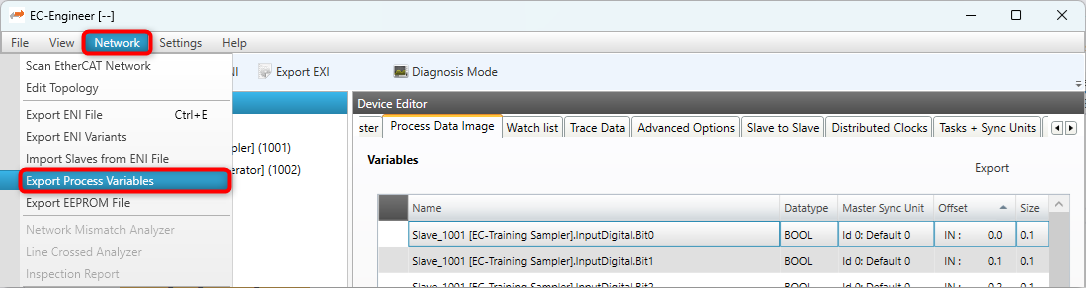
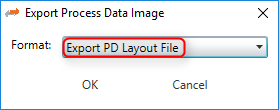
This will generate a header file containing the variables of the SubDevices as follows:
#define PDLAYOUT_IN_OFFSET_SLAVE_1002 9
typedef struct _T_PDLAYOUT_IN_SLAVE_1002
{
    EC_T_SDWORD sdwCounter1_Value;       // Slave_1002 ...Counter1.Value
    EC_T_SWORD  swCounter1_NetworkClock; // Slave_1002 ...Counter1.NetworkClock
    EC_T_SDWORD sdwCounter2_Value;       // Slave_1002 ...Counter2.Value
    EC_T_SWORD  swCounter2_NetworkClock; // Slave_1002 ...Counter2.NetworkClock
} EC_PACKED(1) T_PDLAYOUT_IN_SLAVE_1002;
#include EC_PACKED_INCLUDESTOP

#include EC_PACKED_INCLUDESTART(1)
#define PDLAYOUT_OUT_OFFSET_SLAVE_1002 9
typedef struct _T_PDLAYOUT_OUT_SLAVE_1002
{
    EC_T_SWORD  swCounter1_Increment;    // Slave_1002 ...Counter1.Increment
    EC_T_BYTE   byCounter1_Enable : 1;   // Slave_1002 ...Counter1.Enable
    //...
} EC_PACKED(1) T_PDLAYOUT_OUT_SLAVE_1002;
#include EC_PACKED_INCLUDESTOP
The following example demonstrates how to access process data variables using a generated PD layout C-header file in myAppWorkPd().
Process data access using generated PD layout C-header file example
#include "pdlayout.h"
static EC_T_DWORD myAppWorkpd(T_EC_DEMO_APP_CONTEXT* pAppContext)
{
    EC_T_DWORD dwInstanceId = pAppContext->dwInstanceId;
    T_PDLAYOUT_IN* poPdIn = (T_PDLAYOUT_IN*)emGetProcessImageInputPtr(dwInstanceId);
    T_PDLAYOUT_OUT* poPdOut = (T_PDLAYOUT_OUT*)emGetProcessImageOutputPtr(dwInstanceId);

    /* Slave_1002 [EC-Training Generator].Counter1.Value (Offset: 9.0) */
    EcLogMsg(EC_LOG_LEVEL_INFO, (pEcLogContext, EC_LOG_LEVEL_INFO,
        "Counter1.Value: %d\n", EC_GET_FRM_DWORD(&poPdIn->sdwSlave_1002_Counter1_Value)));

    /* Slave_1002 [EC-Training Generator].Counter1.Enable (Offset: 11.0) */
    poPdOut->bySlave_1002_Counter1_Enable = 1;

    /* Slave_1002 [EC-Training Generator].Counter1.Increment (Offset: 9.0) */
    EC_SET_FRM_WORD(&poPdOut->swSlave_1002_Counter1_Increment, 100);

    return EC_E_NOERROR;
}
Note
The offsets from the PD layout C-header file (PdLayout.h) are byte offsets, not bit offsets!
It is possible to change the variable names of SubDevices before generating the PD layout C-header file to give them custom names:
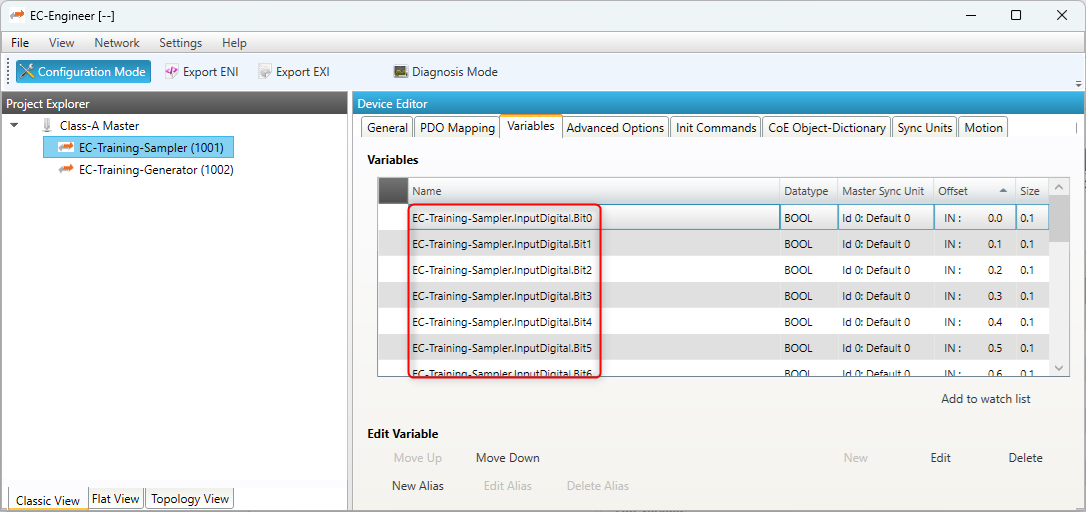
This will generate a header file containing the customized variable names of the SubDevices as follows:
#include EC_PACKED_INCLUDESTART(1)
#define PDLAYOUT_OUT_OFFSET_EC_TRAINING_SAMPLER 0
typedef struct _T_PDLAYOUT_OUT_EC_TRAINING_SAMPLER
{
    EC_T_BYTE   byOutputDigital_Bit0 : 1;   // ...
    EC_T_BYTE   byOutputDigital_Bit1 : 1;   // ...
    EC_T_BYTE   byOutputDigital_Bit2 : 1;   // ...
    EC_T_BYTE   byOutputDigital_Bit3 : 1;   // ...
    EC_T_BYTE   byOutputDigital_Bit4 : 1;   // ...
    EC_T_BYTE   byOutputDigital_Bit5 : 1;   // ...
    EC_T_BYTE   byOutputDigital_Bit6 : 1;   // ...
    EC_T_BYTE   byOutputDigital_Bit7 : 1;   // ...
    EC_T_SWORD  swOutputAnalog_SpeedFactor; // ...
    EC_T_SWORD  swOutputAnalog_Reserved_2;  // ...
    EC_T_SWORD  swOutputAnalog_Reserved_3;  // ...
    EC_T_SWORD  swOutputAnalog_Reserved_4;  // ...
} EC_PACKED(1) T_PDLAYOUT_OUT_EC_TRAINING_SAMPLER;
#include EC_PACKED_INCLUDESTOP
Process data access example using generated PD layout C-header file with customized variable names of the SubDevices
#include "pdlayoutcustom.h"
static EC_T_DWORD myAppWorkpd(T_EC_DEMO_APP_CONTEXT* pAppContext)
{
    EC_T_DWORD dwInstanceId = pAppContext->dwInstanceId;
    T_PDLAYOUT_IN* poPdIn = (T_PDLAYOUT_IN*)emGetProcessImageInputPtr(dwInstanceId);
    T_PDLAYOUT_OUT* poPdOut = (T_PDLAYOUT_OUT*)emGetProcessImageOutputPtr(dwInstanceId);

    /* EC-Training-Generator.Counter1.Value (Offset: 9.0, Size: 4.0, Datatype: DINT) */
    EcLogMsg(EC_LOG_LEVEL_INFO, (pEcLogContext, EC_LOG_LEVEL_INFO,
        "Counter1.Value: %d\n", EC_GET_FRM_DWORD(&poPdIn->sdwEC_Training_Generator_Counter1_Value_Counter1_Value)));

    /* EC-Training-Generator.Counter1.Enable (Offset: 11.0, Size: 0.1, Datatype: BOOL) */
    poPdOut->byEC_Training_Generator_Counter1_Enable_Counter1_Enable = 1;

    /* EC-Training-Generator.Counter1.Increment (Offset: 9.0, Size: 2.0, Datatype: INT) */
    EC_SET_FRM_WORD(&poPdOut->swEC_Training_Generator_Counter1_Increment_Counter1_Increment, 100);

    return EC_E_NOERROR;
}
Note
The offsets are subject to be changed if the ENI file changes. It is strongly recommended to determine the bit offsets of the variables on startup e.g. by querying the bit offset of a SubDevice’s process data by its station address from the EC-Master stack using emGetCfgSlaveInfo() as described in the previous chapters instead of using hard coded values!
3.5.6. Process Data Access Functions
Process data variables that are packed as array of bits are bit aligned and not byte aligned in the process data. See EC_COPYBITS for how to copy data areas with bit offsets that are not byte aligned. Getting and setting bits that are bit aligned and not byte aligned should be done using EC_SETBITS and EC_GETBITS. Accessing complete EC_T_BYTE, EC_T_WORD, EC_T_DWORD, EC_T_QWORD can be accessed more efficiently using the appropriate macros according to the following table.
Note
These functions do not initiate any transmission on the line. Process data is typically transmitted as little endian and must therefore be swapped on big endian systems such as PPC in order to be correctly interpreted, see e.g. EC_SET_FRM_WORD, EC_GET_FRM_WORD .
Variable Type |
Bit Size |
EC Type |
Macro |
|---|---|---|---|
INTEGER8, UNSIGNED8, BIT8 |
8 |
EC_T_BYTE |
N/A |
INTEGER16, UNSIGNED16 |
16 |
EC_T_WORD |
|
INTEGER32, UNSIGNED32, REAL32 |
32 |
EC_T_DWORD |
|
INTEGER64, UNSIGNED64, REAL64 |
64 |
EC_T_UINT64 |
|
BOOLEAN, BIT1…BIT7 |
1 |
EC_T_BOOL |
3.5.7. Process and application variable linking
The value of a process variable can be transferred directly to an application
variable. For this purpose the application variable must be linked to the process
variable. For input process variables this is done either by emLinkInputVarByName()
or by emLinkInputVarByObject(). After receiving all cyclic frames of an MSU
all linked application variables are updated by the value of the corresponding
input process variables without further actions. The functions emLinkOutputVarByName() and
emLinkOutputVarByObject() are used to link output process variables. Before
sending all cyclic frames of an MSU the output process variables are updated by the
linked application variables automatically.
Example of how “Slave_1004 [EL2004].Channel 3.Output” can be linked to an application variable:
EC_T_LINK_VAR_INFO LinkVarInfo;
LinkVarInfo.pvContext = EC_NULL;
LinkVarInfo.pbyApplVar = (EC_T_BYTE*) &S_bSlaveChannel3Out;
LinkVarInfo.wApplVarBitSize = sizeof(S_bSlaveChannel3Out) * 8;
LinkVarInfo.dwApplVarBitOffs = 0;
LinkVarInfo.pfnConverter = EC_NULL;
/* link application variable to process output */
dwRes = emLinkOutputVarByName(dwInstanceId, "Slave_1004 [EL2004].Channel 3.Output", &LinkVarInfo);
For more complicated tasks it is possible to specify a callback function which is called after the input process image was updated resp. before the output process image is sent. The first argument will provide all needed information about the application and the process variable. The second parameter is a pointer to the input resp. output process image. Then the callback has to perform the transition from process to application variable or vice versa and additionally can make further instructions like e.g. a conversion.
Example of callback function inverting output before writing to process image:
EC_T_VOID InvertOutput(const EC_T_LINK_VAR_INFO* pApplVarInfo, EC_T_BYTE* pbyProcessImage)
{
    EC_T_BYTE byOut = *pApplVarInfo->pbyApplVar;
    byOut ^= 0x01;
    EC_SETBITS(pbyProcessImage, &byOut,
        pApplVarInfo->pProcVarInfoEx->nBitOffs, pApplVarInfo->pProcVarInfoEx->nBitSize);
}
Example of how “Slave_1004 [EL2004].Channel 3.Output” can be linked to an application variable with callback function:
EC_T_LINK_VAR_INFO LinkVarInfo;
LinkVarInfo.pvContext = EC_NULL;
LinkVarInfo.pbyApplVar = (EC_T_BYTE*)&S_bSlaveChannel3Out;
LinkVarInfo.wApplVarBitSize = sizeof(S_bSlaveChannel3Out) * 8;
LinkVarInfo.dwApplVarBitOffs = 0;
LinkVarInfo.pfnConverter = InvertOutput;
/* link application variable to process output */
dwRes = emLinkOutputVarByObject(dwInstanceId, EC_TRUE, 1004, 0x7010, 0x01, &LinkVarInfo);
Hint
To link an application variable to a process variable the EC-Master must be within the state INIT resp. PREOP.
Hint
Depending on the main task cycle time linking application variables can have an impact to the performance of the EtherCAT® job task.
Hint
As soon as an application variable has been linked it should stay accessible until
a call to emDeinitMaster() or emConfigureNetwork().