
3.2. Example application
The example application EcMasterDemo handles the following tasks:
Showing basic EtherCAT® communication
EC-Master stack initialization
Start (set all SubDevices into OPERATIONAL state)
“Out of the box” solution for different operating systems, see Platform and Operating Systems (OS)
Thread with periodic tasks and application thread already implemented
- The output messages of the demo application will be printed on the console as well as in some files. The following log files will be created:
ecmaster0.logall messageserror0.logapplication error messages (logged via LogError function)
3.2.1. File reference
The EC-Master Demo application consists of the following files:
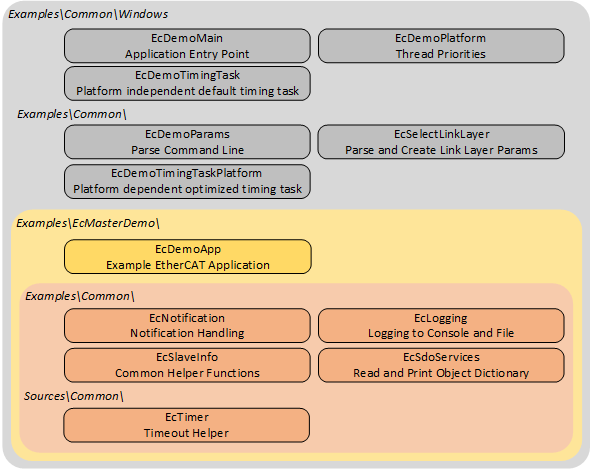
EcDemoMain.cppEntrypoint for the different operating systems
EcDemoPlatform.hOperating system specific settings (taskpriorities, timer settings)
- EcDemoTimingTask[
.h/.cpp] Operating system independent default timing task implementation (base class)
- EcDemoTimingTaskPlatform[
.h/.cpp] Operating system dependent performance increasing overrides of EcDemoTimingTask
EcDemoApp.cppInitialize, start and terminate the EtherCAT® MainDevice
EcDemoApp.hApplication specific settings for EcDemoApp
EcDemoParms.cppParsing of command line parameters
EcDemoParms.hBasic configuration structs and EC-Master parameters
EcSelectLinkLayer.cppCommon Functions which abstract the command line parsing into Real-time Ethernet Driver parameters
EcNotification.cppSubDevice monitoring and error detection (function
emNotify())EcSdoServices.cppCoE object dictionary example
EcSlaveInfo.cppSubDevice information services (bus scan, SubDevice properties, getting information of SubDevices connected to the EtherCAT® bus)
EcLogging.cppMessage logging functions
EcTimer.cppStart and monitor timeouts
3.2.2. EC-Master lifecycle
This chapter provides a brief overview of starting and stopping the EC-Master. Basically the operation of the EC-Master is wrapped between the functions:
and
The EC-Master is made ready for operation and started with the first two functions mentioned. During this preparation, a thread is set up and started that handles all the cyclic tasks of the EC-Master. The last function stops the EC-Master and clears the memory. The following sequence diagram gives an overview of the complete life cycle.
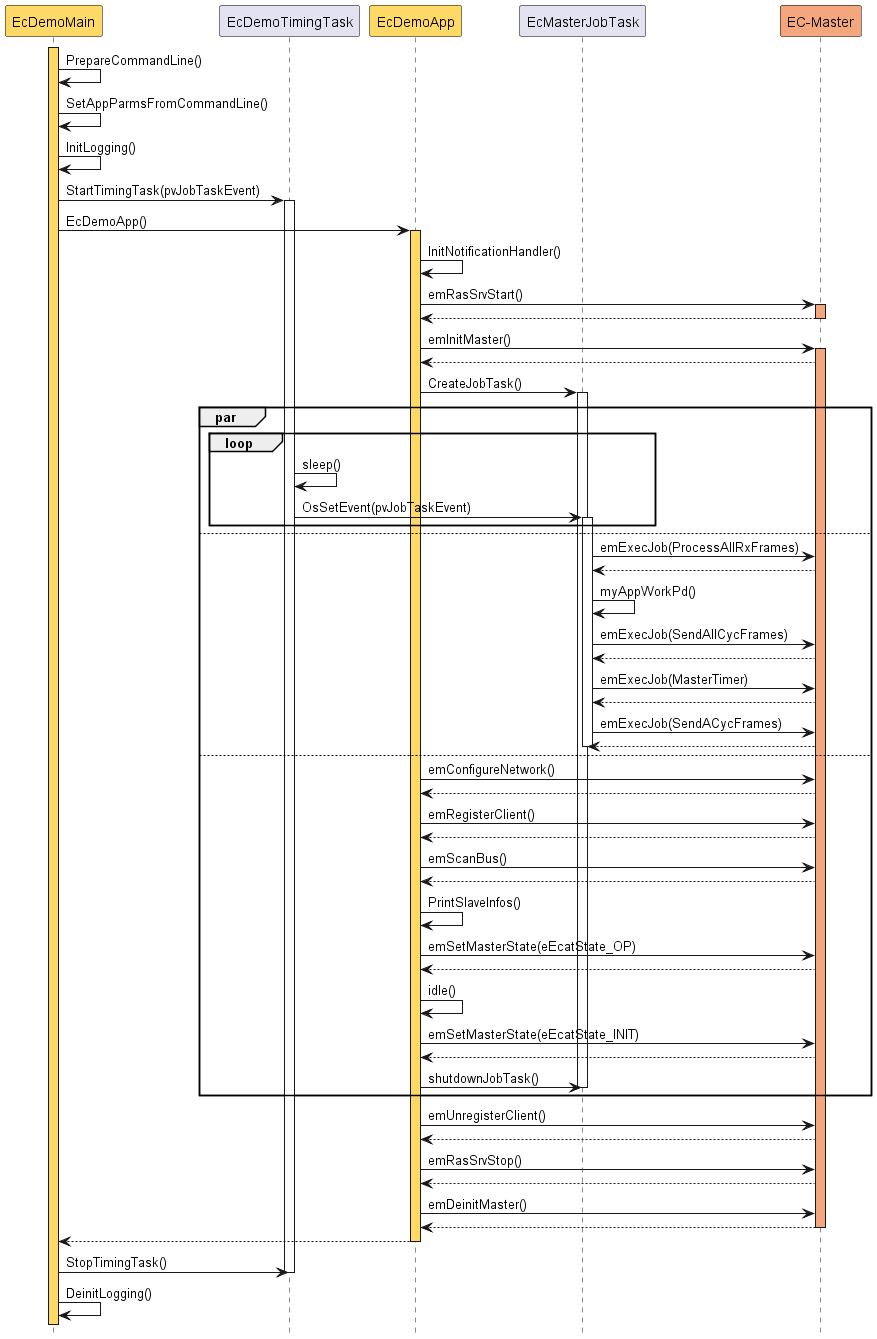
A more detailed description of the functions:
- EcDemoMain()
A wrapper to start the demo from the respective operating system. In addition to initializing the operating system, parsing command line parameters, and initializing logging, it also starts the timing task.
- EcDemoApp()
Demo application. The function takes care of starting and stopping the MainDevice and all related tasks. In between, the function runs idle, while all relevant work is done by the EcMasterJobTask().
- EcMasterJobTask()
Thread that does the necessary periodic work. Very important here is
myAppWorkpd()betweenEC_T_USER_JOB::eUsrJob_ProcessAllRxFramesandEC_T_USER_JOB::eUsrJob_SendAllCycFrames. Application-specific working on process data, which must be synchronous with the bus cycle, can be carried out here.- EcDemoTimingTask()
Timing Thread. This thread sets the timing event that triggers the EcMasterJobTask for the next cycle.
- emInitMaster()
EC-Master API function: Prepare the EC-Master for operation and set operational parameters, e.g. used Real-time Ethernet Driver, buffer sizes, maximum number of SubDevices, … .
- emConfigureNetwork()
EC-Master API function: Loads the configuration from the ENI (XML file).
- emRegisterClient()
EC-Master API function: Register the application as a client at the EC-Master to receive event notifications.
- emSetMasterState()
EC-Master API function: Start the EC-Master and switch the bus to the different states from INIT to OPERATIONAL.
- emDeinitMaster()
EC-Master API function: Clean up.
3.2.3. Synchronization
This chapter relates the tasks or functions that run in the EcMasterJobTask() to the timing and communication on the EtherCAT® bus.
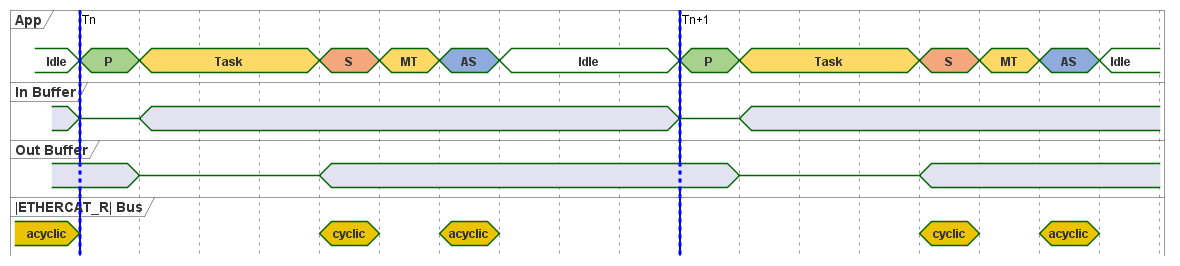
- App
Shown are the tasks/jobs
P,Task,S,MTandASwhich must be done by the application every single cycle. The details of the individual tasks are described below. Once all tasks are finished, the application is idle for the next cycle.- In buffer
Shown are the contents of the input section of the process image. The contents are not valid while the EtherCAT® MainDevice updates the data
P.- Out buffer
Shown are the contents of the output section of the process image. The contents are not valid while the application updates the data
Task.- EtherCAT® bus
Shown are the timing positions, when the EtherCAT® MainDevice does cyclic and acyclic communication on the EtherCAT® bus. Besides the timing position of the start for the cyclic frames, the shown positions may vary, depending on the number of frames.
In EcDemoApp.cpp the tasks/jobs shown in the timing-diagram are managed and scheduled by EcMasterJobTask().
- Job
P The job
EC_T_USER_JOB::eUsrJob_ProcessAllRxFrameshandles the frames and data received from previous bus activity, including both cyclic and acyclic frames. These received frames are analyzed for new input data, and the local process image is updated accordingly. During this update, the input data section of the process image is invalid.TaskThe function
myAppWorkpd()allows application-specific working on process data. In this function, the application can use updated input information from JobP, perform calculations and manipulations, and write new data to the output section of the process image.- Job
S The job
EC_T_USER_JOB::eUsrJob_SendAllCycFramesinitiates the transmission of all cyclic frames on the EtherCAT® bus.- Job
MT The job
EC_T_USER_JOB::eUsrJob_MasterTimerserves as an administrative role, primarily managing the timeout timers. During these calls, there is no interaction with the process image, nor do they trigger any bus traffic. It is not essential to run this function with every bus cycle, particularly in systems with cycle times shorter than 1 ms. However, it is recommended to run this function at a 1 ms interval.- Job
AS The job
EC_T_USER_JOB::eUsrJob_SendAcycFramesschedules the transmission of acyclic frames.IdleCurrently implemented to wait for the next cycle, which is triggered by the timing event.
3.2.4. Event notification
The EC-Master provides event notification for a great number of events. These events are for example:
Bus state change
Link state change
Working counter errors
…
Any thread can register for these events to be notified. This is achieved by calling the API function
-
EC_T_DWORD emRegisterClient(EC_T_DWORD dwInstanceID, EC_PF_NOTIFY pfnNotify, EC_T_VOID *pCallerData, EC_T_REGISTERRESULTS *pRegResults)
In case of the EcMasterDemo the class CEmNotification is provided. It implements the complete framework to catch and handle the EC-Master notifications. The class is instantiated once and registered at the EC-Master with the call emRegisterClient() shown above. The class implements the method ecatNotify() as major entry point (or callback function) for events.
There are two different ways events can be handled. The method of handling an event is primarily determined by the time required to handle the event and the processing context in which the event is to be handled. The methods are described below.
3.2.4.1. Direct notification handling
Smaller events can be handled directly in the context in which they are detected. A possible example of such an event is the detection of a false work counter (WKC). The procedure is as follows:
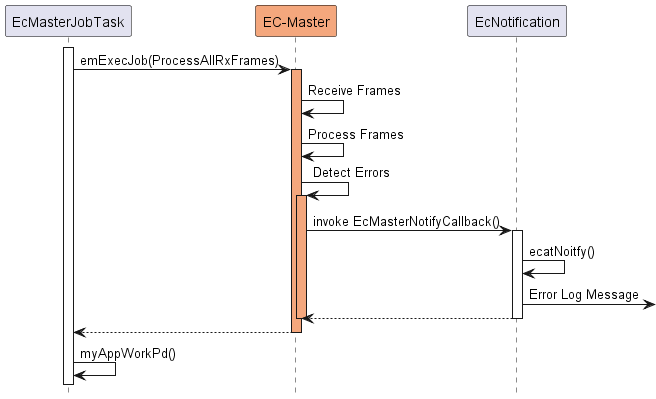
The event handling is reduced to simply issuing a log message, which is not time critical. The event is handled directly within the context of the emExecJob() ( eUsrJob_ProcessAllRxFrames) function.
3.2.4.2. Postponed notification handling
Events that require more time-consuming processing cannot be handled directly in the context in which they are detected. The handling or processing of the event must be postponed. This is accomplished through a queue, which is also readily implemented using the CEmNotification class. The procedure is as follows:
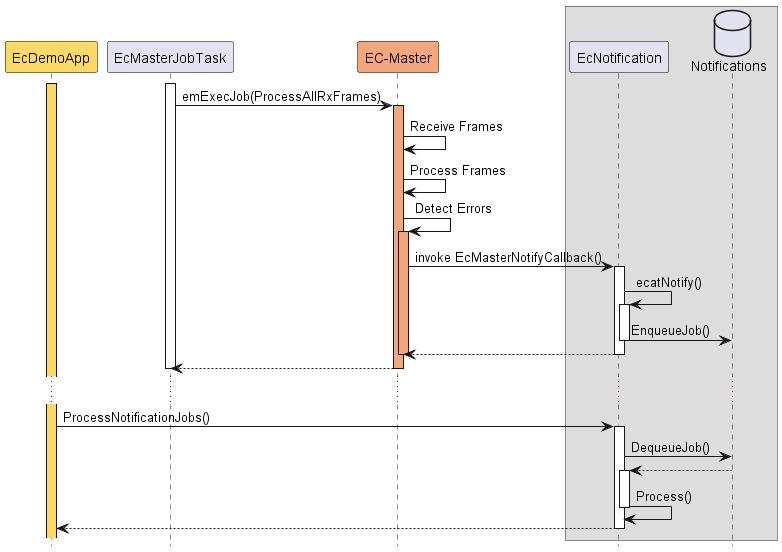
By calling periodically CEmNotification::ProcessNotificationJobs(), the application checks and handles all queued notifications.
Important
The call of CEmNotification::ProcessNotificationJobs() shall NOT be executed in the EcMasterJobTask(). As the CPU time consumption may be high, this would have a high impact to the real-time behavior of the cyclic operation.
3.2.5. Logging
The EcMasterDemo examples demonstrate how log messages can be processed by the application, see Examples/Common/EcLogging.cpp.
The messages processed by EcLogging.cpp are of different types, e.g. EC-Master log messages, application messages, DCM messages and are logged to the console and/or files.
Identical messages are skipped automatically by default.
Note
With some operating systems, logging in files is deactivated, e.g. because a file system is not available.
3.2.5.1. Parameters
The verbosity of the EcMasterDemo is specified as a -v command line parameter. It is used to determine the log level of the application, see EcDemoMain.cpp.
For performance reasons the EC-Master automatically filters log messages according to EC_T_LOG_PARMS::dwLogLevel.
EcLogging.cpp has various parameters beside the log level, like Roll Over setting, log task prio and affinity, log buffer size, etc. See EcMasterDemo for reference.
3.2.5.2. Configure EC-Master logging
The EC-Master logging is configured on initialization, see EC_T_INIT_MASTER_PARMS::LogParms in emInitMaster().
The application can provide customized log message handlers of type EC_PF_LOGMSGHK if the default handler in EcLogging.cpp does not fulfill the needs of the application.
Note
The callback is typically called from the context of the EcMasterJobTask and should return as fast as possible.